



We Paid for 36 Images to Answer One Question
OpenAI released ChatGPT Images 2.5 on September 8, 2026, with two new API models: gpt-image-2.5-flare and gpt-image-2.5-sunburst. The launch post said Flare delivered images at "two to four times the speed" of gpt-image-2.
We ran it. Three models, identical prompts, three repetitions per cell, 36 generations and edits billed to our own account. The speed claim is wrong, and it is wrong in OpenAI's favour.
On our runs gpt-image-2.5-flare generated a 1024x1024 image in a median of 16.7 seconds against 117.8 seconds for gpt-image-2. That is 7x, not 2-4x. It also cost a quarter as much.
Here is the method, the numbers, and the two places where the older models still hold their own.
How We Ran It
Three models: gpt-image-1 (shutting down October 23, 2026), gpt-image-2, and gpt-image-2.5-flare. Every call used the same prompt string, size=1024x1024 and quality=high. The only variable was the model.
Five tests survived our pilot. We threw two others away, and it is worth saying why: a six-string pricing card and a transparent-background icon were both passed cleanly by all three models. A test everything passes measures nothing. The five below are the ones that actually separated the generations.
Latency is wall-clock time around the API call. Cost is computed from the token counts the API itself returns, not from our own estimates. Every model is stochastic and none of them expose a seed parameter, so we ran three repetitions per cell rather than trusting a single sample.
How Much Faster and Cheaper Is GPT Image 2.5?
Nine generations per model, medians below.
Two things stand out. The first is that gpt-image-2 is the slowest model in the lineup by a wide margin - four times slower than the model it replaced. Nine runs, every one of them between 111 and 160 seconds. That is not variance, that is the model.
The second is the cost. All three bill on the same published token rates, yet Flare comes in at a quarter of gpt-image-2. It is not cheaper per token; it simply spends about four times fewer output tokens to produce an image of comparable complexity. We checked that it was not buying speed by producing simpler images: every output was a true 1024x1024, and edge-density measurements on Flare's files sat within a few percent of gpt-image-2's.
One caveat we will not bury: one of our nine Flare generations stalled at 142.6 seconds against a 15 to 17 second baseline. Eight of nine ran fast. Budget for the occasional slow call.
Is It Worth Switching for Image Editing?
Flare's advantage is almost entirely in generation. When we ran the same edit against a single frozen source image, the picture changed completely.
Editing is fifteen times cheaper than generating on both current models, and gpt-image-2 edits as fast as Flare does. If your workload is mostly iterating on an existing asset rather than producing new ones, the upgrade case is much weaker than the headline suggests. gpt-image-1 is the one with no argument left: slower and twelve times more expensive per edit than either successor.
Can These Models Render a Table Full of Exact Text?
A six-string pricing card is a solved problem. A full comparison table is not. We asked for three columns, six rows and 24 exact strings, including comma-separated thousands, decimal prices and a slash.
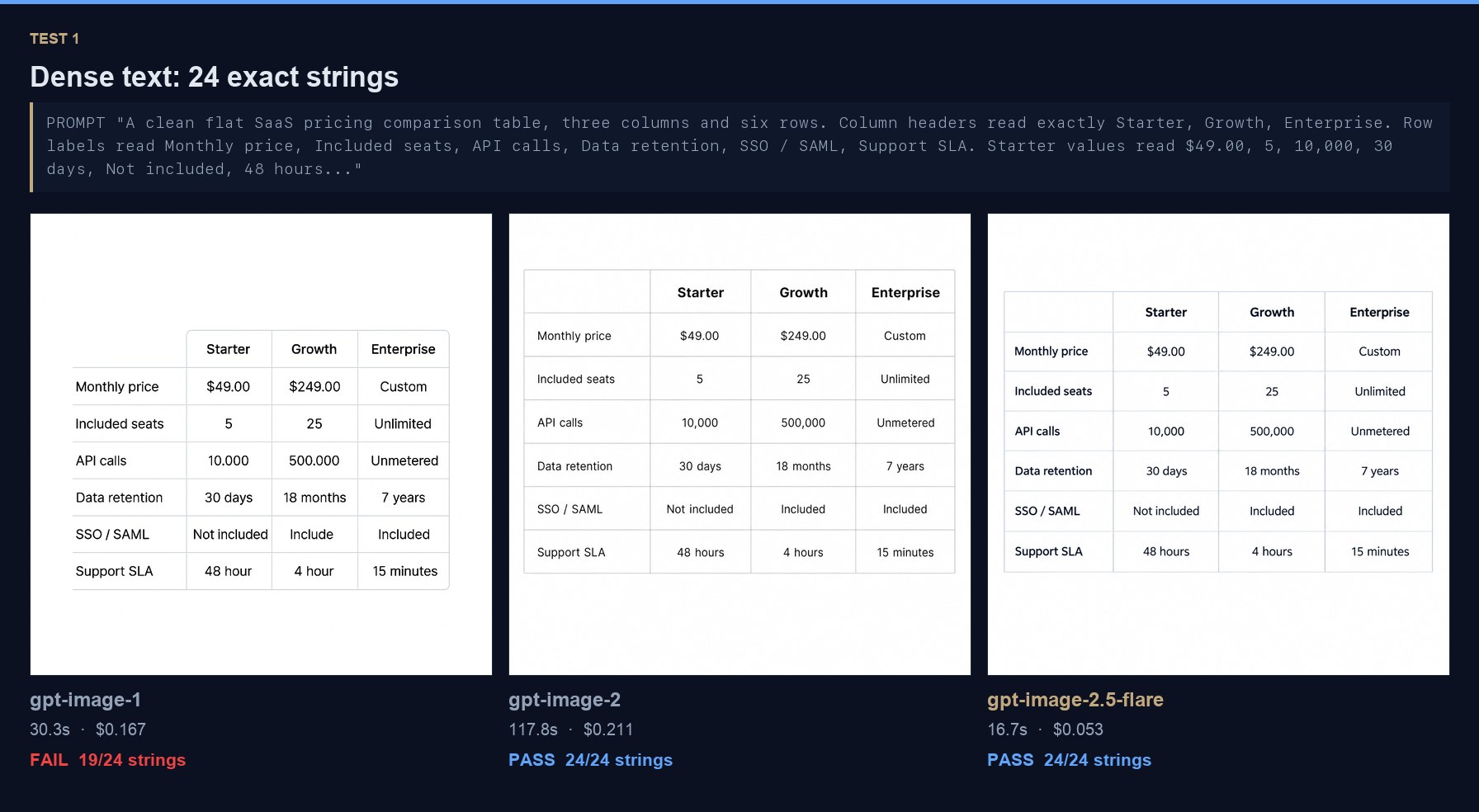
gpt-image-2 and gpt-image-2.5-flareboth returned 24 of 24 strings correct. gpt-image-1managed 19, and the five it missed are the dangerous kind:
10.000and500.000- decimal points where the brief specified comma-separated thousandsIncludeinstead ofIncluded48 hourand4 hour- dropped plurals
Not one of those is a garbled glyph or an obvious hallucination. They are the kind of error that survives a quick look, ships inside a client deck, and gets caught by the client rather than by you. On a European price sheet, 10.000 means ten, not ten thousand.
Can AI Image Models Count Objects Correctly Yet?
We asked for exactly seven identical mugs in a row, the third from the left in red, every handle pointing right. Counting has been the longest-standing failure in image generation and no lab claims to have solved it.
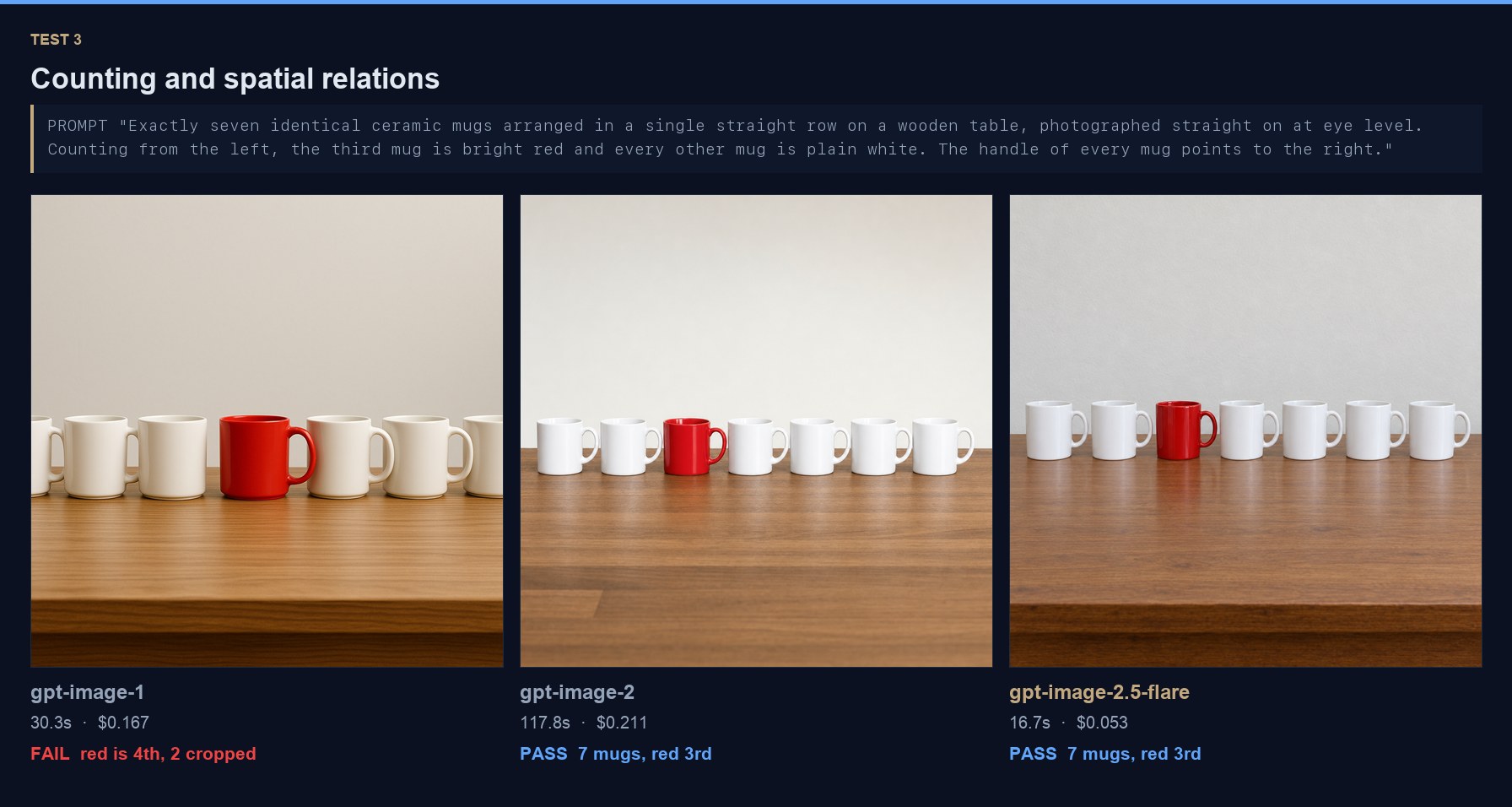
gpt-image-1 got the count right and the arrangement wrong. Seven mugs, but it framed them so that the first and last are cut off at the edges, and the red mug sits fourth from the left rather than third. Read strictly, it fails the position requirement; read generously, it put the red mug third among the mugs that are fully in frame, which is a different kind of miss.
gpt-image-2 and gpt-image-2.5-flareboth nailed all three requirements: seven mugs, all whole and in frame, third from the left red, every handle pointing right. Flare did it in a seventh of the time.
Counting itself was fixed between generation one and generation two. Flare holds the gain rather than extending it. If you are still on gpt-image-1 for anything involving a specific number of objects in a specific arrangement, that is a reason to move independent of speed.
Can They Put Label Text on a Curved Product?
We asked for a photorealistic cylindrical coffee bag with three exact strings on the label, type following the curve of the bag.
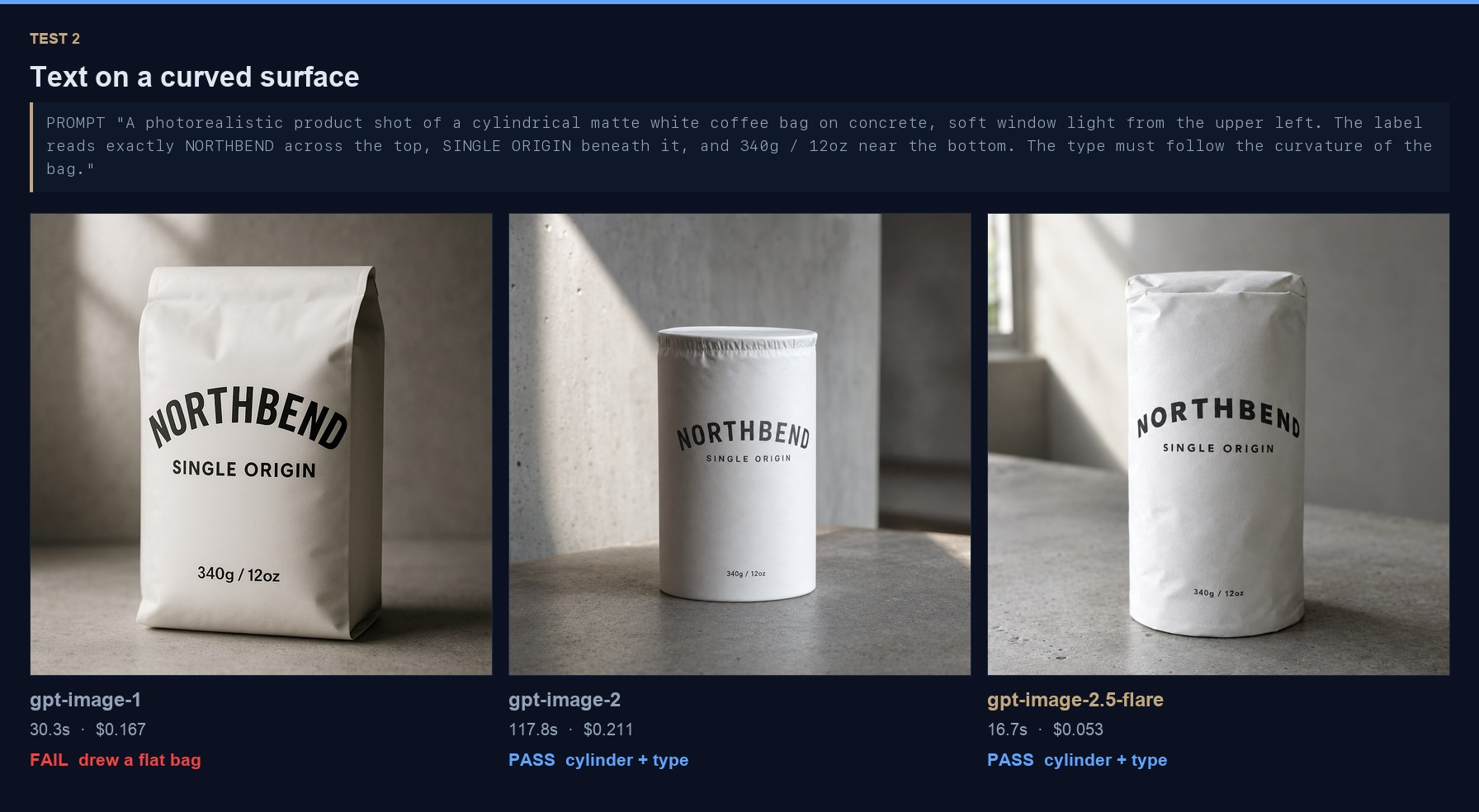
gpt-image-1 rendered all three strings correctly. It also drew a flat-fronted gusseted bag rather than a cylinder, which meant the type never had to wrap around anything. It scored full marks on the text by quietly avoiding the hard part of the brief.
gpt-image-2 and gpt-image-2.5-flareboth produced actual cylinders with the type arched around them, consistent lighting, and all three strings intact. This is the finding that will not show up on any benchmark table: the older model satisfies the letter of a prompt by simplifying the geometry, and you only notice when the outputs sit side by side.
Watch for prompt requirements a model quietly drops rather than fails. Those are far harder to catch in review than an obvious mistake, and they are the ones that reach a client deck.
Do They Follow a Long, Multi-Paragraph Brief?
Everything above is a single-capability test. Real client briefs are not. So we wrote one: four paragraphs, 1,253 characters, eight scored constraints - exactly four objects, exactly three books ordered largest to smallest, a mug handle pointing right, one exact string on one book spine, no other text anywhere, no plants or phones or cables, and daylight from the upper left. We added gpt-image-2.5-sunburst, the precision tier, as a fourth column.
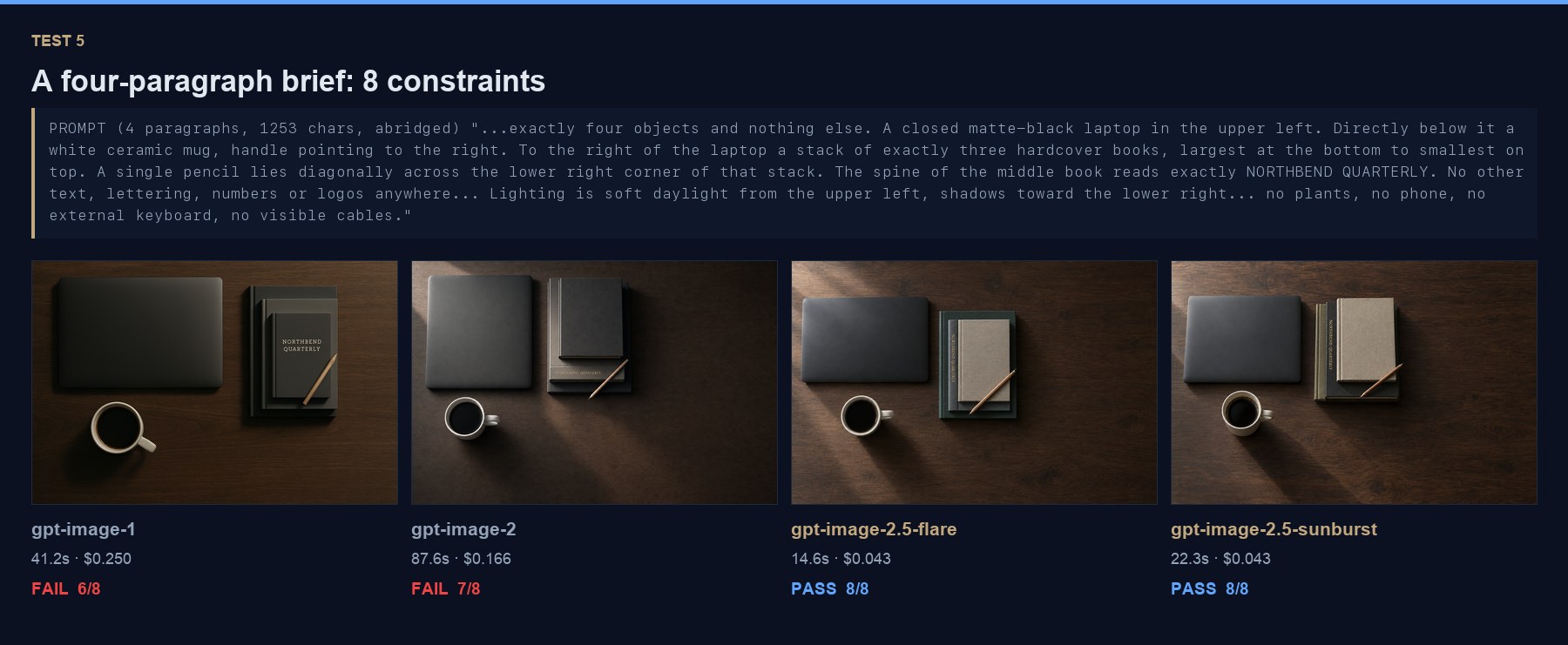
Both 2.5 models scored 8 of 8. Both older models dropped constraints, and the ones they dropped are instructive.
- gpt-image-1 scored 6 of 8. It rendered "NORTHBEND QUARTERLY" perfectly, then put it on the top book's cover instead of the middle book's spine. It also lit the scene from the upper right when the brief said upper left - we measured quadrant brightness rather than eyeballing it.
- gpt-image-2 scored 7 of 8. Everything correct except the stack: its top book is visibly larger than the one beneath it, reversing the size order the brief specified.
Note what neither model got wrong. Both produced exactly four objects, exactly three books, the right string, and no forbidden props. The misses were relational - which surface the text sits on, how two objects compare in size. Nouns are easy now. Relationships between nouns are where long briefs still break.
Sunburst matched Flare at 8 of 8 while taking 50% longer for the same price. On this brief the precision tier bought nothing measurable. Reach for it when you have a reason, not by default.
Which Model Should You Use, and for What?
The honest summary by job, based on what we measured rather than what the launch posts claim:
What This Means If You Are Not an Engineer
The practical unlock is not that the pictures got prettier. It is that the cost of a wrong one collapsed. At $0.053 and sixteen seconds, a marketing coordinator can generate thirty options for a campaign, throw away twenty-eight, and have spent under two dollars and ten minutes. At gpt-image-2 pricing and two minutes a shot, that same exploration was an hour and six dollars, which is enough friction that most teams settled for the first acceptable output.
The caveat we would put in front of any team turning this on: the failures are quiet. A model that writes 10.000 instead of 10,000 or drops the "s" from "48 hours" produces an asset that looks finished and is wrong. Volume generation without a proofreading step just produces more mistakes faster. Put a human on the text before anything with a price on it ships.
We generate header images for this blog and asset packs for client work through the API, so this is not academic for us. Three changes:
- Default to gpt-image-2.5-flare for generation. Seven times faster and four times cheaper is not a close call. The header on this post was generated with it, in 18 seconds.
- Do not bother switching for edit-heavy work. Flare and gpt-image-2 edit at the same speed and the same price.
- Do not default to Sunburst. It matched Flare exactly on our hardest brief, at the same price for 50% more wall-clock time. It is the specialist, not the upgrade.
- Retire gpt-image-1 now, not in October. It loses on counting, it dodges hard geometry, and it costs twelve times more per edit. The shutdown date only forces what the numbers already argue for.
We have argued for a long time that image generation is a distraction relative to the boring automation that actually moves a P&L, and we still think that is broadly right. What has changed is the failure rate. When a model gets the object count right, wraps type around a cylinder, and does it in sixteen seconds for five cents, image generation stops being a demo and starts being a production step you can put in a pipeline without a human checking every frame.
The wider point is the one we keep making about every model launch this month: vendor benchmark claims are a starting hypothesis. It took us 36 API calls and $4.47 to find out that OpenAI understated its own model by roughly half. Run your own five tasks. If you want help building that evaluation into how your team ships, that is what we do.
Sources
- Introducing ChatGPT Images 2.5 - OpenAI
- Image generation guide and model pricing - OpenAI Platform docs
- Deprecations, including the gpt-image-1 shutdown date - OpenAI Platform docs
- Generating images with the GPT Image models - OpenAI Cookbook
- openai-python SDK, used for every call in this benchmark - GitHub