




Short answer: a Claude Code mod is a plugin made of function hooks that runs inside the Claude Code session itself. It can draw a live pane beside the transcript, a band above the prompt, a status line or a toast, and it can block, rewrite or react to any tool call before it runs. Mods hot-reload while you work, and Claude Code can write them for you. We built twelve in one night and open-sourced ten of them.
At a Glance
| Question | Answer |
|---|---|
| What is a mod? | A Claude Code plugin whose hooks module runs in the session and draws UI |
| What can it draw? | Panes, a band above the prompt, status line entries, toasts, slash command output |
| What can it control? | Tool calls, prompts, the system prompt, sounds, model calls, timers |
| How big is one? | Three files minimum: a manifest, a hooks list, one TypeScript module |
| Do you have to write it yourself? | No. Ask Claude Code for one and it writes, validates and loads it |
| Where does it draw? | The terminal and the Code tab of the Claude Desktop app. Hooks also run in VS Code and claude -p, without UI |
| Our repo | github.com/OneWave-AI/claude-code-mods: ten MIT-licensed mods, 155 tests, installable with /plugin |
Anthropic shipped mods on October 1
Anthropic opened mods to everyone with Claude Code 2.1.287 on October 1, 2026. The launch post came from the Claude developer account, alongside an official mods guide and a getting-started tutorial by Addy Osmani.
You can now mod Claude Code: change how it behaves, customize the UI, swap in your own features. Write one with a few lines of TypeScript, or have Claude build it for you. Mods ship inside plugins, so you install them with /plugin in the CLI or desktop app.
Boris Cherny, who created Claude Code, made the case we agree with most: there is no reason every team should run an identical Claude.
Mods are absolutely insane. You can now customize Claude to work and look the way you want by just prompting it. Each person works differently, so there's no reason why everyone should have an identical Claude experience.
We started building the same night.
The mod that stopped us
A little before 3 in the morning, while we were packaging these mods to publish, Claude tried to clean up a folder of screenshots with a recursive delete. One of the mods we had built less than an hour earlier, launch-codes, caught the command, raised a red-alert pane and refused to run it without a code. Claude reported the block, rewrote the cleanup as a file-by-file delete, and moved on.
That is the whole argument for mods in one moment. A guardrail you can describe in a sentence became a guardrail that runs on every Bash call, in our own terminal, written in an evening.
Skills change what Claude knows. Hooks change what Claude is allowed to do. Mods change what you see while it works, and they can do all three.
What a Claude Code mod actually is
A mod is a Claude Code plugin with a hooks module: a TypeScript file that exports one register function. Inside it, on(event, hook) attaches a function to an event such as a tool call, a prompt submit, the start of a session, or a request to draw a part of the interface. Each hook gets the engine, the event and a next function, so it can pass the event through, change it, or answer it without passing it on.
That last part is what separates mods from the shell-script hooks most teams already use. A settings hook runs a command and returns a verdict. A mod lives in the session, keeps state, and draws. Its hooks run everywhere Claude Code runs, but according to Anthropic's mods guide what it draws only shows up in the terminal and the Code tab of the Desktop app. The VS Code chat panel, claude -p and cloud sessions run the hooks without the panes.
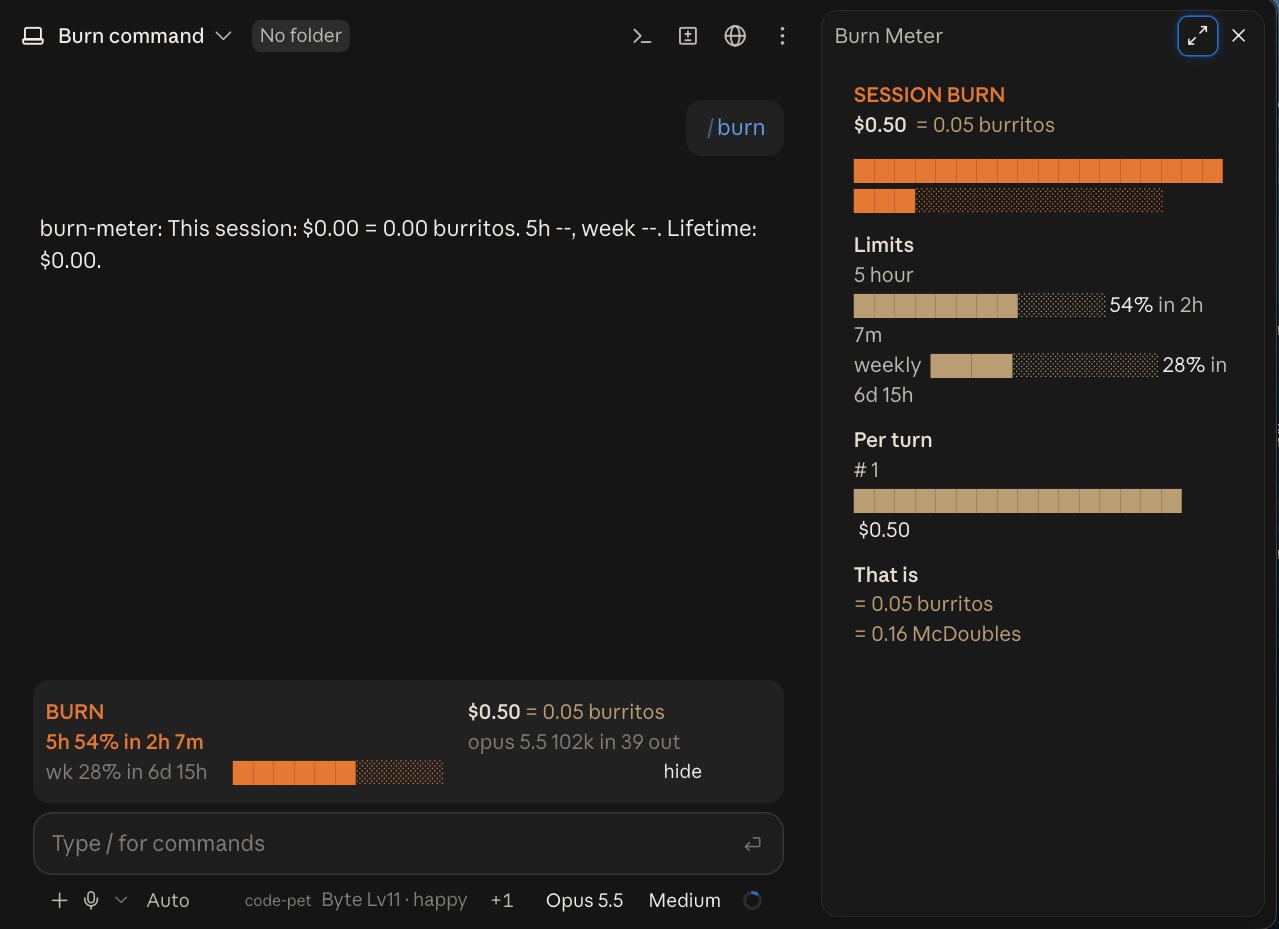
The same mods run in the Desktop app. This is burn-meter in the Desktop Code tab: the pane on the right, the band above the prompt, and code-pet's status line next to the model picker, all from the same files that run in the terminal.
Claude Code CLI 2.1.287 changelog: New features: Added Claude Mods: plugins may now modify deeper behavior.
The minimum is three files:
.claude-plugin/plugin.jsonwith a name, version and descriptionhooks/hooks.jsonpointing at the modulehooks/register.tsx, the module itself
claude plugin validate checks a mod the way the engine will load it, and claude plugin test runs its tests against the real engine. Every mod in our repo ships with tests, because a hook that throws is skipped silently and a mod that seems to do nothing usually threw.
The ten we open-sourced
We did not plan a product. We started with one idea at midnight and kept asking for the next one. Here is what came out, roughly in order of how useful they turned out to be.
burn-meter
Get it: burn-meter source on GitHub · /plugin install burn-meter@claude-code-mods
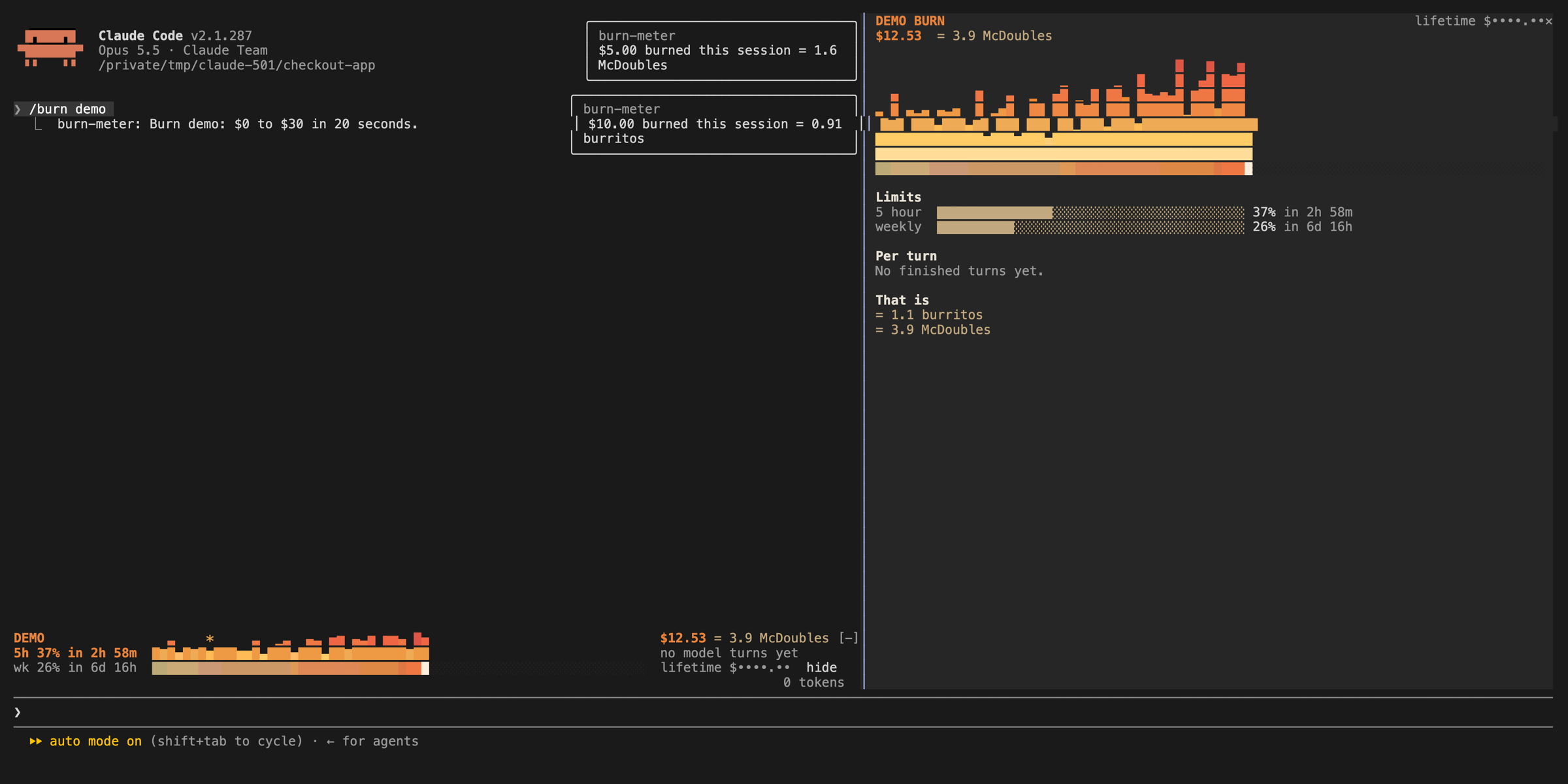
A band above the prompt with a growing fire bar for session spend, plan-limit bars with reset times, and the cost translated into burritos and McDoubles. It sounds like a joke. It is the one we watch most, because spend you can see is spend you manage.
launch-codes
Get it: launch-codes source on GitHub · /plugin install launch-codes@claude-code-mods
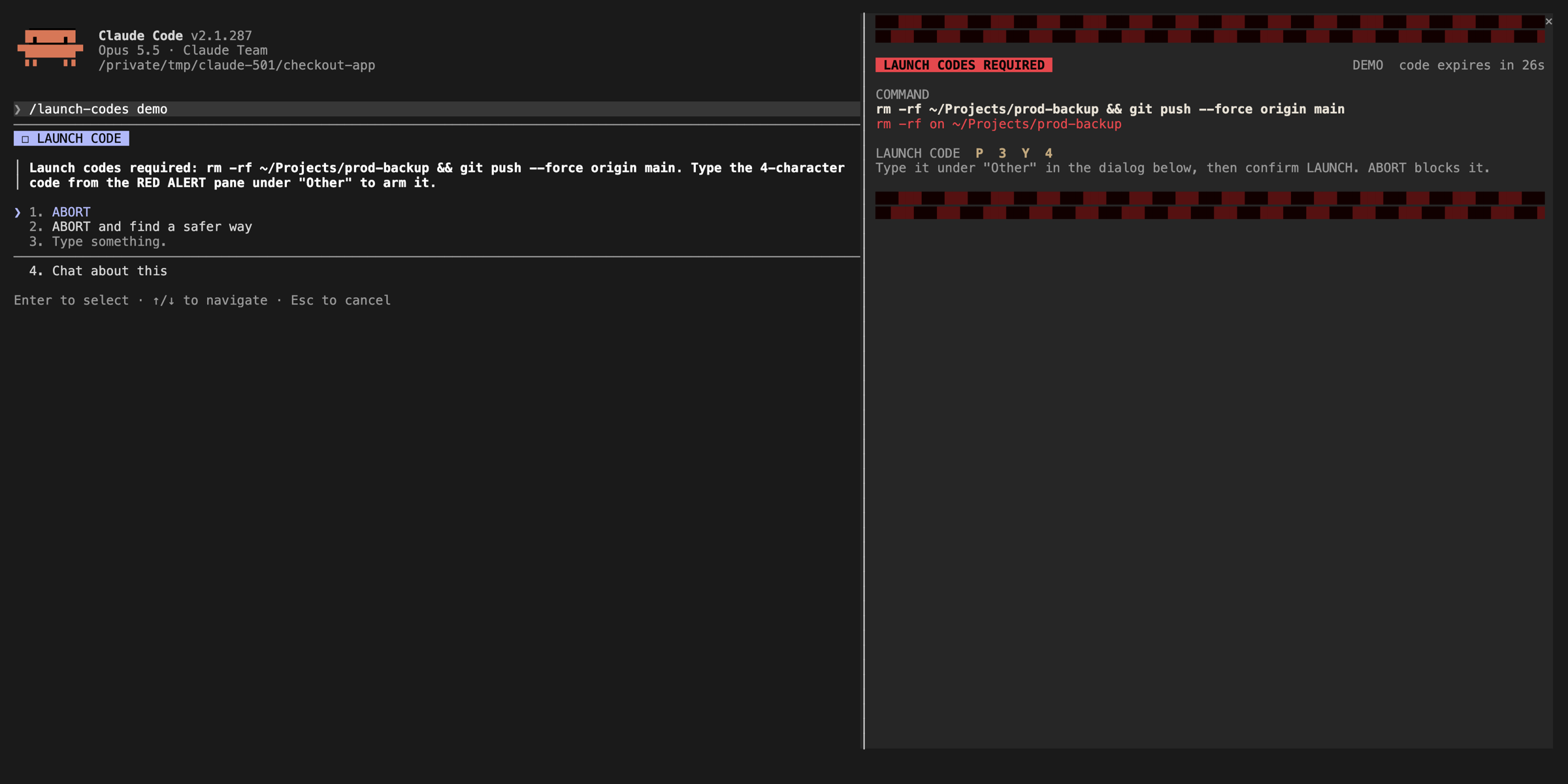
Classifies every Bash command before it runs. Risky rm -rf, force pushes, git reset --hard, DROP through a live SQL client, production deploys and downloaded scripts piped into a shell all need a one-time code. It has 64 tests, more than any other mod in the repo, because a guardrail that fires on grep -r TODO gets turned off by lunch. Anthropic ships a sample mod with the same instinct, blast-radius, which holds a risky command and shows what it would change before you proceed.
session-wrapped
Get it: session-wrapped source on GitHub · /plugin install session-wrapped@claude-code-mods
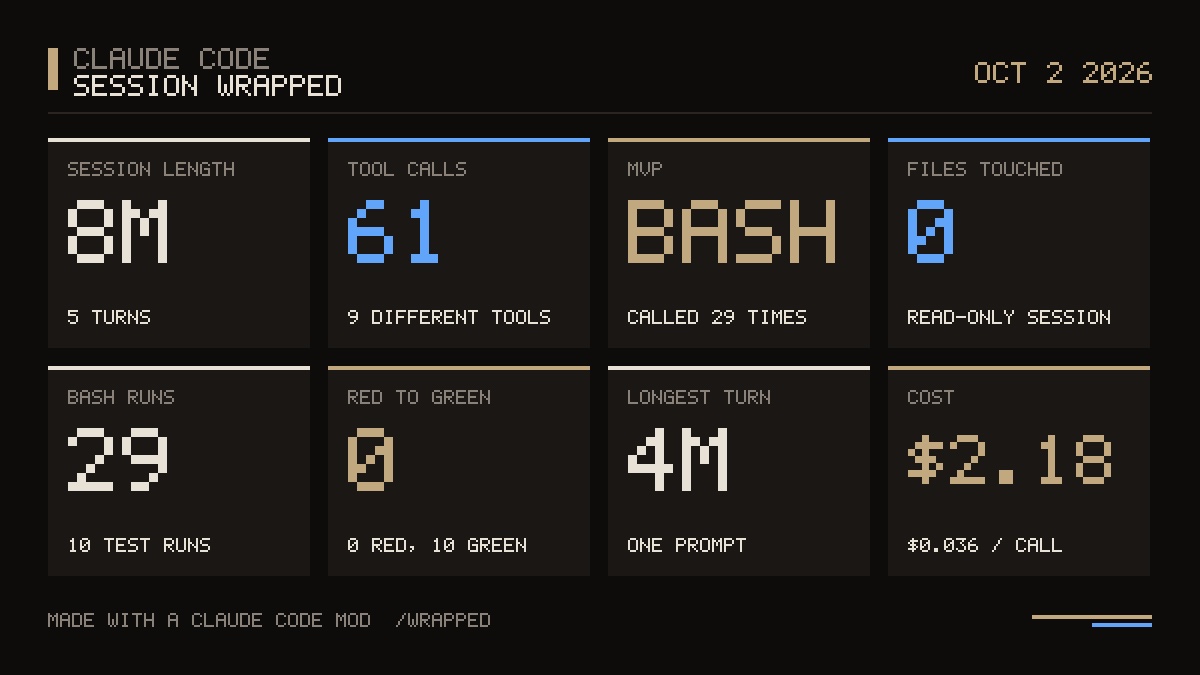
Spotify Wrapped for a session. /wrapped plays an animated reveal of tool calls, the MVP tool, red-to-green test runs and cost, then writes a shareable PNG. The PNG encoder is written inside the mod, since a hooks module has no Node and no DOM.
boss-fight and code-pet
Get it: boss-fight source on GitHub · code-pet source on GitHub · /plugin install boss-fight@claude-code-mods
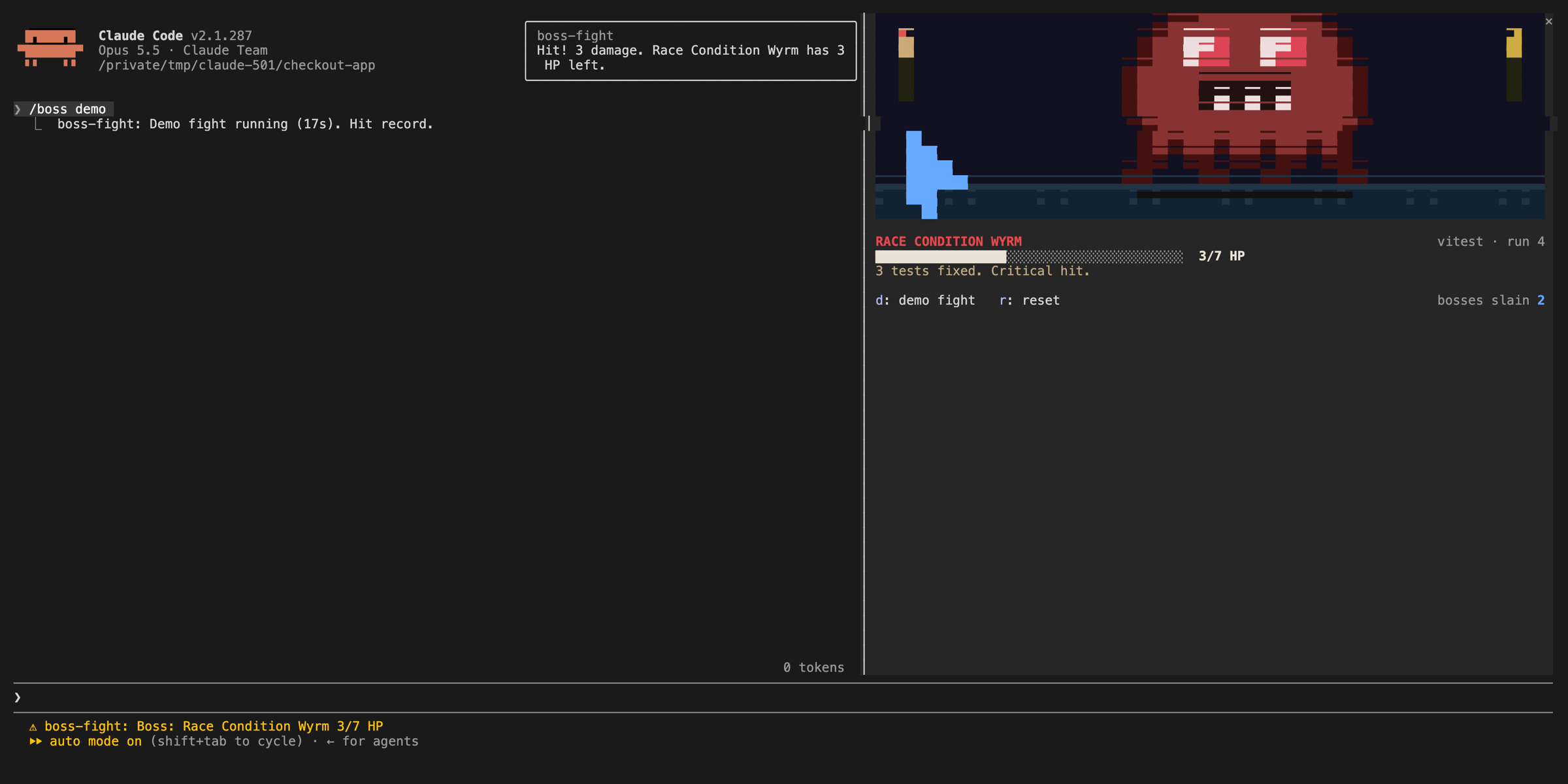
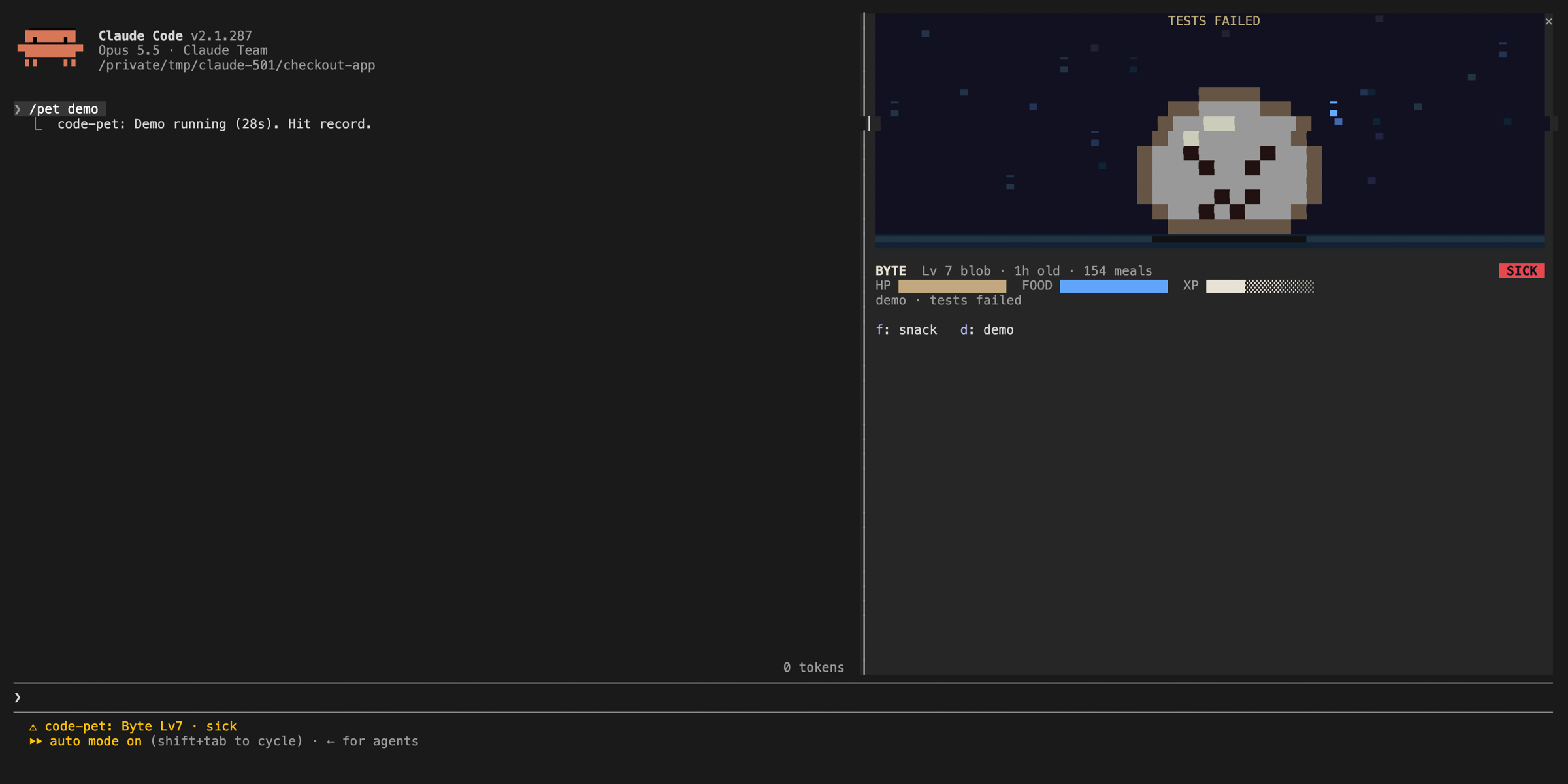
Failing tests spawn a pixel boss with one HP per failure, and every run that fixes tests lands a hit. code-pet is a pixel creature that eats on tool calls, gets sick on failures, panics on destructive commands and sleeps when you stop. Both read real test output from vitest, jest, pytest, mocha and cargo.
inner-monologue and sportscaster
Get it: inner-monologue source on GitHub · sportscaster source on GitHub · /plugin install inner-monologue@claude-code-mods
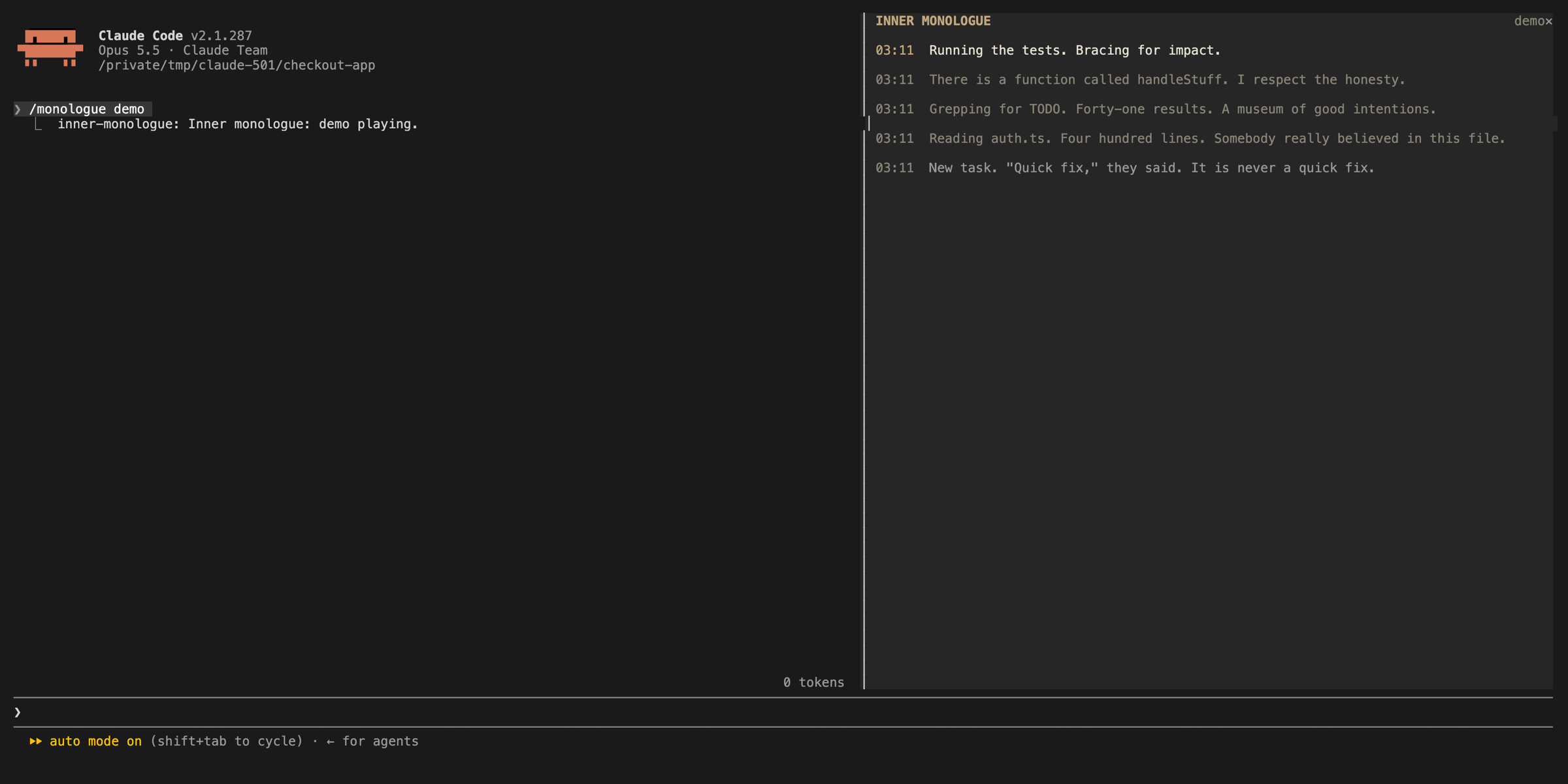
Two mods that call a model from inside the session. One writes Claude's dry inner thoughts about what it just did. The other calls the session as live sports play-by-play, out loud, with generated crowd audio. Neither makes anyone faster. Both made it obvious when the agent was going in circles.
Sound on. This is the sportscaster calling a scripted session in a real Claude Code terminal:
agent-narrator, agent-race and inbox-alerts
Get it: agent-narrator source on GitHub · agent-race source on GitHub · inbox-alerts source on GitHub · /plugin install agent-narrator@claude-code-mods
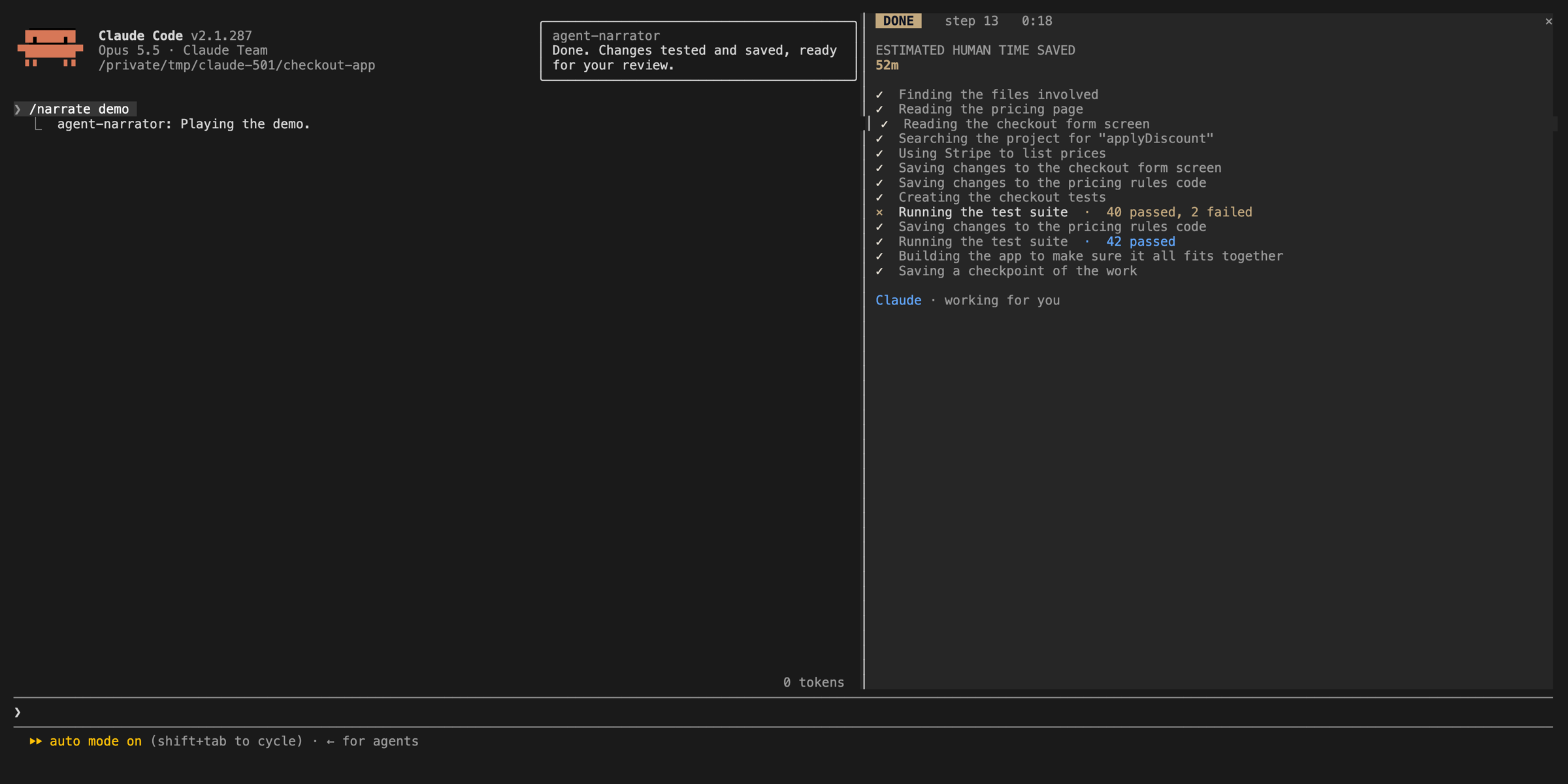
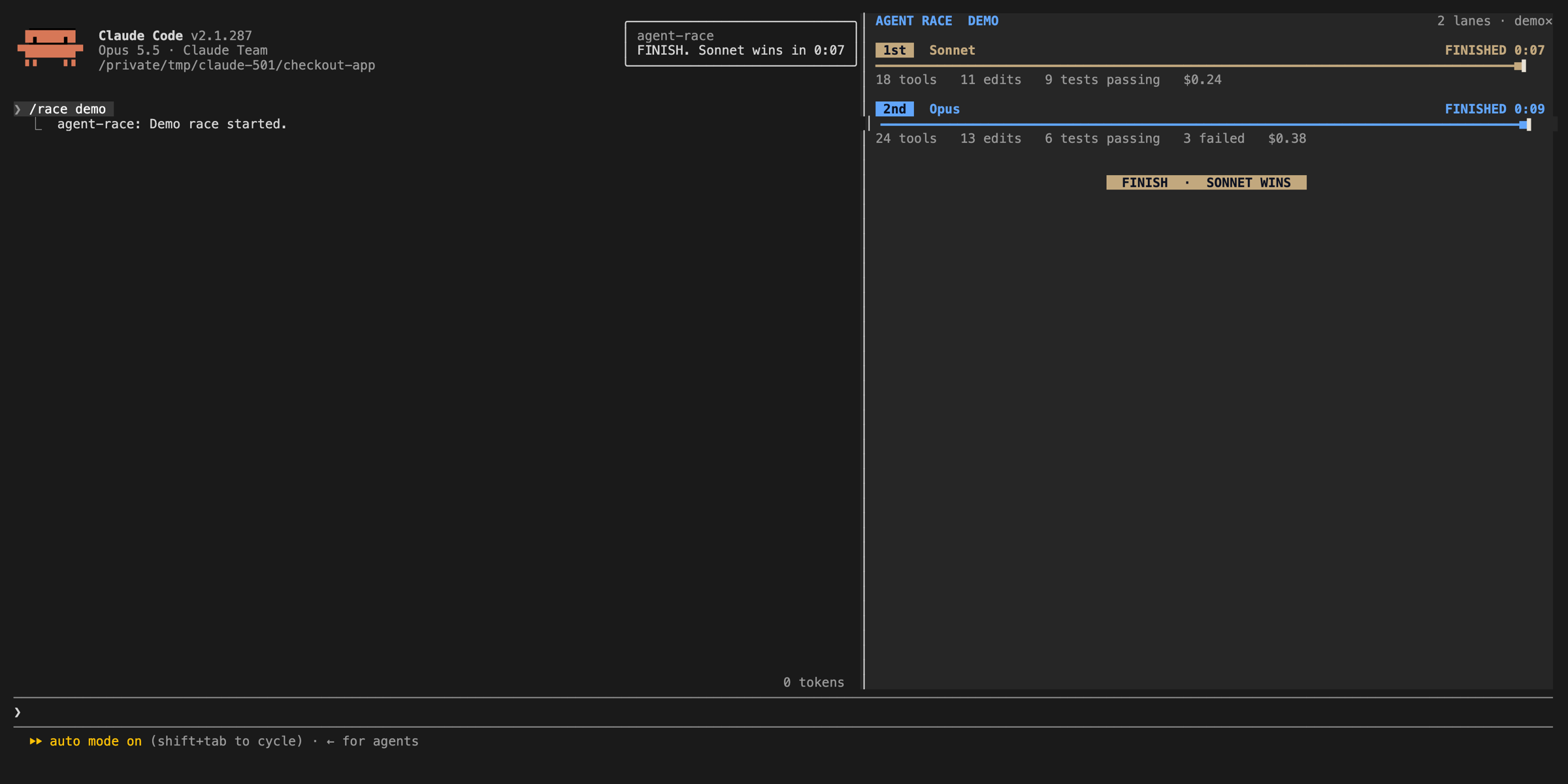
- agent-narrator turns each step into one plain-English sentence with a running time-saved estimate. We built it for training rooms where nobody has watched an agent work before.
- agent-race puts several sessions on one track for the same task, which is the fastest way we have found to compare models or prompts side by side.
- inbox-alerts polls Gmail, Slack and Calendar through the claude.ai connectors and surfaces new items as toasts and a pane, so you stop alt-tabbing out of the terminal.
What we learned building twelve in a night
- Ask for the mod, do not write it. Claude Code ships a plugin-authoring skill that knows the API. Every mod here started as one sentence typed into a session.
- A hook that throws fails quietly. Midway through the night the burn meter vanished, and the only sign was one dim transcript line:
ui.render hook skipped: threw TypeError. Tests are how you find that before your team does. - Put state where the engine keeps it. A hot reload resets the module's own variables. Values the drawing reads belong in the session's state, or the pane goes blank on every edit.
- Two stayed private. One runs our agency operations against our own CRM, the other gates client data. Mods that touch your own systems are the most valuable ones, and the ones you should not publish.
Where this fits for a business
Most companies we train still treat Claude Code as a chat window that edits files. Mods are the layer where a team encodes how it works: which commands need a second look, what spend looks like in real time, what a non-engineer sees when the agent is running. That is the same idea behind the Claude skills library and the skills we use to run the company, pushed into the interface itself.
It also needs a policy. Anthropic's guide is blunt that a mod is code running with your permissions: it can read your files and environment variables, see every prompt, approve tool calls and spend your usage, and it is not sandboxed. Before anyone installs a mod, run claude plugin validate on it, which lists every event it hooks and every call it makes without running it. Organizations can restrict mods through managed settings.
The repo is at github.com/OneWave-AI/claude-code-mods. Add it in any session with /plugin marketplace add OneWave-AI/claude-code-mods, install the ones you want, and break them. If you want help deciding which guardrails your team should run, that is a Claude Code consulting conversation we have every week.
Sources
- Mods overview - Claude Code documentation
- Getting started with Claude Code mods - Addy Osmani, Anthropic
- Mods launch post - @ClaudeDevs on X
- Sample mods - anthropics/claude-code-playground
- Plugins - Claude Code documentation
- Plugins reference - Claude Code documentation
- Hooks reference - Claude Code documentation
- Status line configuration - Claude Code documentation
- claude-code-mods - OneWave AI on GitHub