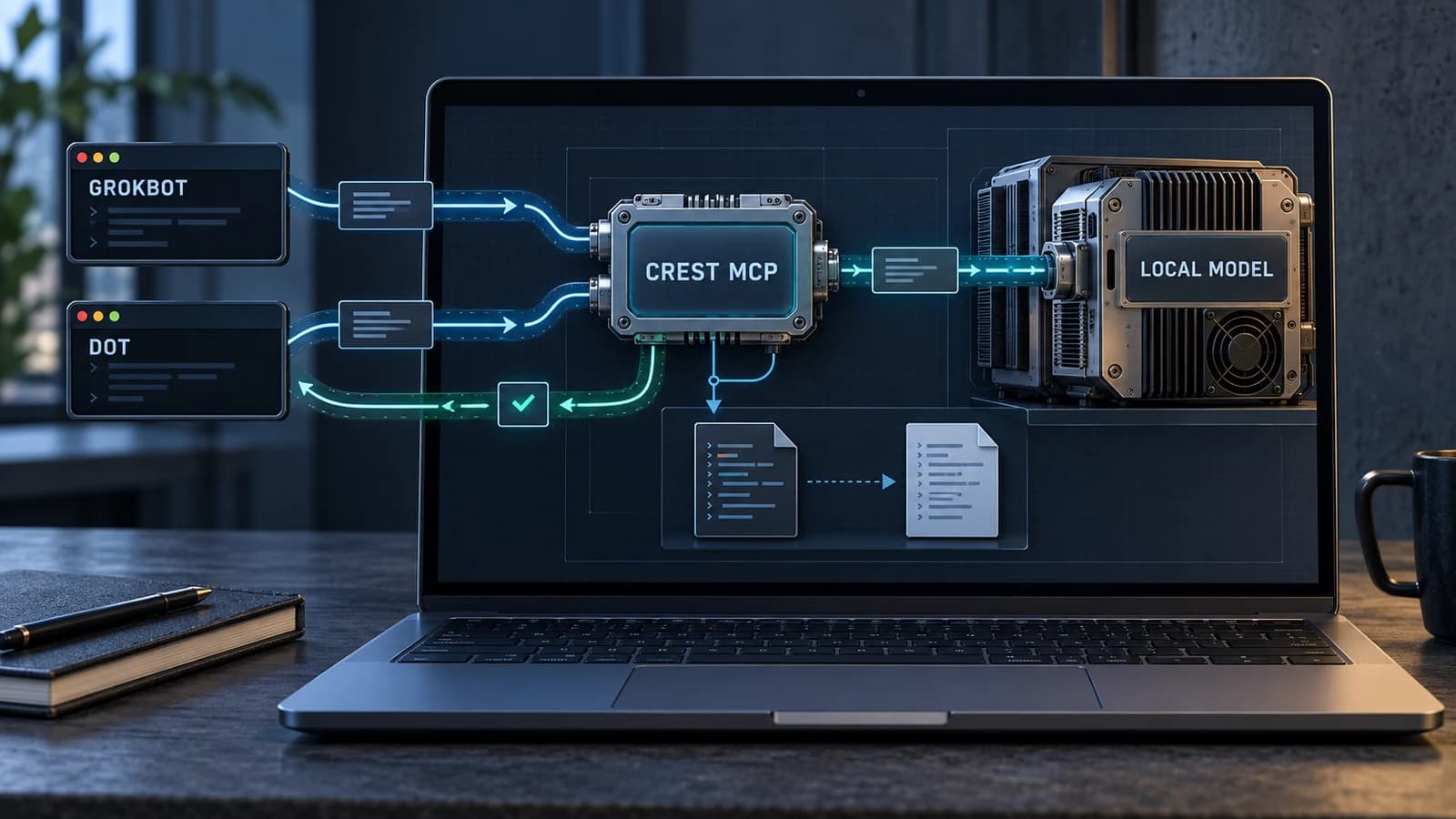




Crest is our own coding harness. We added an MCP interface so Grokbot and Dot can ask it to run focused coding jobs on models installed on our computer. The calling agent chooses the task and reviews the result; Crest handles local model access, file scope, task tracking and original-content backups.
That makes the connection useful beyond the desktop app itself. An agent can delegate a small code change through a defined interface, get a task ID back, and inspect what happened without keeping one HTTP request open for the entire generation.
For this article, we exercised that interface on a synthetic one-file task. The local worker corrected a function, Crest reported the changed file, and we ran four assertions ourselves. The first model/runtime combination failed before editing anything, which was an equally useful part of the check.
Why expose our harness through MCP?
We already had the local execution path in Crest. Adding the interface meant other agents could use that path while retaining their own role in the workflow: deciding what should change, choosing the files, checking the diff and accepting or rejecting the result.
MCP defines how applications discover and call tools. It does not determine whether a code change is correct or how much authority a tool should have. We had to define those decisions in Crest's API and job runner.
In our setup, Grokbot and Dot are callers of the harness. Their MCP connection must be able to reach Crest's authenticated local endpoint. This is an integration we configured, not a claim that every hosted assistant can reach a laptop or that every MCP client supports every protocol version.
The broader agent-orchestration question is who owns each responsibility. Here the split is explicit: the caller owns intent and acceptance; Crest owns the bounded local coding job.
The data flow from agent to local code
Crest MCP · coding-job data flow
The caller delegates; Crest controls local execution
- 1 · Grokbot or DotSends a focused prompt, project folder, explicit files and review/edit mode through its MCP connection.
- 2 · Crest MCP + job runnerAuthenticates the caller, checks the scope, starts the job and returns a durable task ID.
- 3 · Local Ollama modelReceives scoped source and generates a structured result. It does not run commands or tests.
- 4 · Crest applies the editChecks the returned paths and original contents, preserves originals and writes permitted files.
- 5 · Caller reviewPolls the result, inspects changedFiles and backups, reviews the diff and runs tests.
Schematic of the documented coding path. Crest listens on authenticated loopback HTTP. Caller text, task reports and any inspected code remain subject to that caller's data policies. Backups support recovery; cancellation does not roll back files already written.
A request includes an absolute project path, a focused prompt, a named list of files and a mode. Review mode returns an answer without writing source files. Edit mode can create or replace only the listed files after validation.
Crest reads the scoped source locally and sends the job to Ollama. The model returns a structured answer. Crest checks the returned file paths and original contents, preserves the originals, and applies the permitted edits. The caller polls the task, inspects the reported changes and runs its own verification.
The documented MCP endpoint is http://127.0.0.1:19431/mcp. Crest must be open, and callers must supply the local bearer credential. Keep that credential in private local configuration; it is not needed in a prompt or blog example. The Crest API reference documents the connection and request contract.
A small tool surface with a clear lifecycle
The interface exposes five tools:
| MCP tool | Responsibility |
|---|---|
crest_status | Check Crest availability and recent tasks. |
crest_models | Inspect local Ollama availability and installed models. |
crest_start_task | Start a scoped review or edit and receive its task ID. |
crest_task_status | Poll the report, changed files, backup path and errors. |
crest_cancel_task | Cancel running work; already-written files remain. |
crest_start_task returns a task ID immediately. The caller can come back with crest_task_status rather than relying on a long-lived model request. Status is running, completed, failed or cancelled.
The task report includes fields such as summary, changedFiles, backupPath and error. Those fields are part of the handoff. A caller should inspect them before deciding what to do next, particularly after an interrupted or partially applied edit.
MCP requests are stateless in this implementation. Coding tasks are durable application data. These are separate layers: losing a protocol connection does not mean the task identifier disappears. The runner restores the latest 100 reports after restart, marks interrupted jobs failed and does not automatically replay them.
A scoped edit we verified
We created a small Python file with the wrong implementation:
def add(a, b):
    return a - b
The task asked for addition, preserved the public function signature, and allowed changes to add.py only. These were the relevant tool arguments, with a generic project path:
{
  "projectPath": "/absolute/path/to/demo-project",
  "prompt": "Fix add(a, b) so it returns the sum of its arguments. Preserve the function signature. Change only add.py.",
  "files": ["add.py"],
  "mode": "edit",
  "model": "granite4.2:3b",
  "requestKey": "addition-demo-unique-request"
}
The completed task reported changedFiles: ["add.py"] and produced:
def add(a, b):
    return a + b
We then checked positive numbers, a negative input, zeros and decimal values. All four assertions passed. We also checked that the original subtraction implementation was present in Crest's backup.
This is a narrow functional check through the connected Crest MCP interface. It is not a client-specific certification of Grokbot or Dot, a benchmark of model quality, or evidence that a larger refactor will succeed. The sanitized validation record includes the test scope and results without local credentials or private project paths.
Model packaging can change whether the same interface works
Our first attempt used the installed qwen3.5:4b model running through an MLX runtime. That runtime returned HTTP 501 with structured output is unavailable. Crest reported the task as failed and no source file was changed.
We then selected the installed GGUF-based granite4.2:3b model explicitly. That request completed, and the edit passed our checks. We did not route the failed local job to a cloud model.
The lesson is to verify the exact model/runtime combination. A model name alone does not establish support for the structured-output contract the harness expects. These observations describe the installed runtimes used for this check, not a universal statement about either model family.
The shipped live smoke-test script provides a repeatable MCP check using temporary source files. For the article, we also reran the local API and coding-service suites: 12 tests passed. They cover authentication, tool discovery, task handling, file scope, backups, concurrent-edit checks and cancellation behavior.
The controls belong in the harness
| Control | What it contributes |
|---|---|
| Explicit files | Only listed files may be changed; returned paths are checked. |
| Original-content checks | Detect a file changed while the local model was working. |
| Backups before writes | Preserve original content to support manual recovery. |
| Retry keys | Deduplicate identical retries within retained task reports; changed parameters conflict. |
| Caller verification | Review generated code and run tests outside the worker. |
An edit requires an explicit file list. The runner rejects traversal, symlinks and several sensitive paths, checks generated paths against the allowlist, and checks that the original contents have not changed before applying an edit. Those controls constrain the worker; they do not make arbitrary generated code trustworthy.
The model worker does not execute shell commands or run tests. Review and testing belong to the caller. Backups also do not imply automatic rollback: cancelling a task leaves any files already written in place. A failed job can have partially applied changes, so callers must inspect the report and backups.
The implementation is available for inspection. Its documented job limits include one active model task at a time, bounded source context and a generation timeout. Those limits make small, explicit assignments the appropriate starting point.
Local inference and token efficiency
Moving code generation to a local model can avoid cloud inference for that portion of the work. The calling agent still spends usage framing the job, invoking tools, polling, reviewing the diff and handling corrections. If the caller reads the entire source and repeatedly redoes the local answer, much of the expected advantage can disappear.
The right comparison is total cost per accepted coding task, including local compute and human review. We have not established a measured savings percentage for this Crest example. Our separate Grunt token-efficiency and ROI article provides a data-flow explanation and an illustrative calculator for that accounting.
Crest and Local Grunt Adapter have different permissions. Crest's edit mode can change allowed project files with backups. The adapter returns bounded text results or private artifacts and does not edit source. Choose the execution path based on the job and the required controls.
Connection and privacy boundaries
Crest's service binds to loopback, requires bearer authentication, and rejects browser Origin headers and unexpected Host headers. It is a personal local service. A cloud-hosted agent cannot reach your laptop merely by using the same localhost URL; its local connector or other explicitly secured arrangement must provide the connection. The documented endpoint should not be exposed through a public tunnel.
Local inference also does not hide returned information from the caller. Prompts, task reports and code the caller inspects can reach that caller's provider. Crest's MCP service is not the adapter's sensitive=true private-artifact workflow, and it is not a system-wide data filter.
For deployment planning, our local-model guide covers the hardware and operating considerations. Start the harness integration with a synthetic review task, then a one-file edit, and verify the complete lifecycle before granting it more work.
The source, API contract and tests are public in OneWave-AI/Crest. The useful architectural result is a reusable boundary: Grokbot and Dot can request local coding work through our harness, while scope enforcement and task state remain in Crest and acceptance remains with the caller.
Quick answers
What does Crest MCP let Grokbot and Dot do?
In our configured setup, their MCP connection can submit scoped review or edit tasks to Crest, inspect installed local models, poll durable task reports and cancel running jobs. Crest sends generation work to local Ollama.
Does the local model run commands or tests?
No. This worker generates structured results and can edit allowed files through Crest. The calling agent reviews the diff and runs tests outside the worker.
Do backups mean cancellation automatically rolls back edits?
No. Original-content backups support recovery, but files already written remain after cancellation. Failed tasks can also have partial changes; inspect changedFiles and backupPath.
Does local inference guarantee lower usage or private results?
No. The caller still uses resources for coordination and review, and returned information can reach its provider. Measure the whole workflow per accepted task, and treat private-output handling as a separate requirement.