




This Week, Our CRM Stopped Being a Website
We have an internal CRM — self-built, self-hosted, perfectly good app. It has an MCP server attached to it so Claude can read and write our accounts, deals, contacts, and tasks. That server has existed for months and it works.
This week we shipped something different. The same MCP server now serves an interactive panel — a real pipeline board with drag-and-drop deal cards, a task manager with working checkboxes, sortable tables, an analytics view with a revenue trend and a conversion funnel — rendered inside the Claude window. Not a link to our app. Not a screenshot. The UI itself, running in a sandboxed iframe in the conversation, with the chat thread that led to it still sitting right there above it.
Drag a deal from Discovery to Negotiation in that panel and it is a real, attributed write to our production database, stamped with the identity of whoever's API key is installed. Check off a task and it calls the same complete_task tool the model would have called. The panel is not a view of the CRM. For most of what we do with the CRM, the panel is the CRM.
To be precise, because the headline overstates it: the real CRM did not go anywhere. It is still deployed, still the place we go for the heavy work — bulk edits, configuration, anything that needs a full screen. What died is not the app. It is the trip to the app, for the eight or ten interactions a day that were never worth a context switch. That turns out to be most of them.
10-second loop, opens fullscreen. Mock data.
 OneWave-AI
 What can we tackle together?
OneWave CRM
OneWave CRM
open_crm_record
</>
What can we tackle together?
OneWave CRM
OneWave CRM
open_crm_record
</>

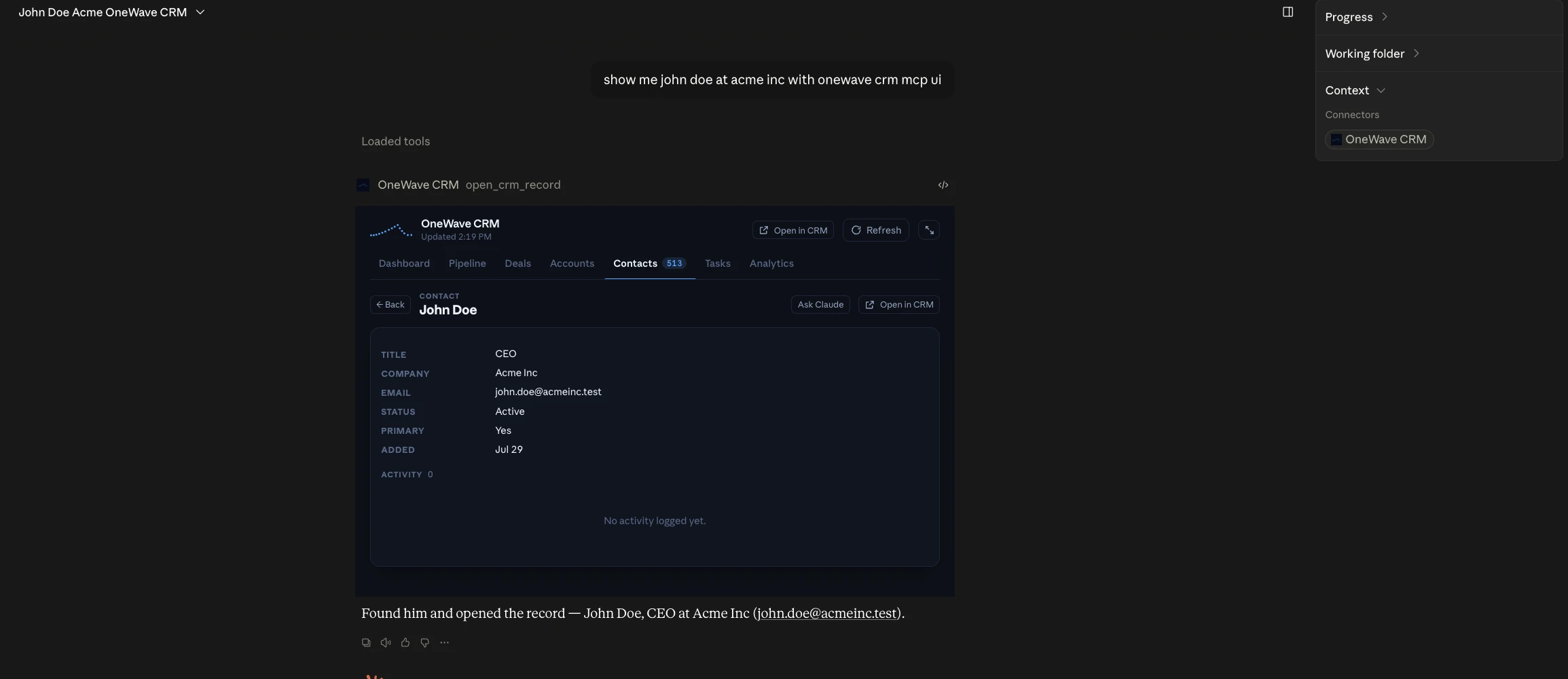
The whole interaction, on a loop: one sentence, the connector loads, and open_crm_record hands back a live panel you can work in. Rendered in the page, not a recording. Mock data.
Worth saying plainly, because it is the only reason any of the detail below is worth reading: we built this CRM and we run it. It is not a vendor demo or a sandbox. It is the system our team uses to manage real accounts and real pipeline, we own the API and the auth, and we shipped the panel against our own production data. That cuts both ways, and the honest caveat belongs here rather than buried: controlling both ends made this dramatically easier than it will be for a team integrating with someone else's API. What we did not have to negotiate, most people will.
That was possible because of the MCP 2026-07-28 specification, which landed yesterday and is the largest revision the protocol has had. Most of the coverage is describing it as a scalability and security release. That is accurate and it badly undersells what happened.
The interesting question is not what MCP can do now. It is what Claude became the moment MCP could do it.
What Actually Shipped
Two changes matter enormously. Everything else in the release is excellent plumbing.
1. The protocol went stateless
MCP was born stateful. A client opened a connection, performed an initialize/initialized handshake, received a Mcp-Session-Id, and every subsequent request rode that session. The 2026-07-28 spec deletes all of it. The handshake is gone, the session header is gone, and each request now carries its own protocol version, client identity, and capabilities in _meta fields. There is an optional server/discover call for clients that want to ask what a server can do, and HTTP requests now carry Mcp-Method and Mcp-Name headers so gateways can route and meter without parsing a JSON body.
The practical consequence: any request can land on any server instance behind plain round-robin load balancing, with no shared session store. MCP servers become ordinary serverless functions. They scale like web endpoints because they now behave like web endpoints.
There is also a replacement for the thing sessions were quietly doing. Multi Round-Trip Requests let a server that needs mid-call input return resultType: "input_required"; the client retries the original call with the answers in inputResponses. No held-open stream required. Long-running work moved out of the core into a io.modelcontextprotocol/tasks extension with poll-based tasks/get and tasks/update. List responses got ttlMs and cacheScope so clients stop refetching tool lists. Authorization got hardened against OAuth mix-up attacks, with mandatory iss validation and client credentials bound to their issuing authorization server. Roots, Sampling, Logging, and the legacy HTTP+SSE transport are deprecated on twelve-month clocks.
2. Tools can now return a user interface
MCP Apps graduated out of experimental. The mechanism is small enough to describe in a paragraph. A tool declares _meta.ui.resourceUri pointing at a ui:// resource. That resource returns an HTML page. The host preloads it, renders it in a sandboxed iframe inside the conversation, and hands it the tool's result. The app and the host then talk over a postMessage JSON-RPC dialect — some methods shared with core MCP like tools/call, most of them new under a ui/ prefix.
The sandbox is the browser sandbox. The app cannot touch the parent DOM, read the host's cookies or local storage, navigate the parent page, or run script in the parent context. It declares which external origins it needs via _meta.ui.csp and requests elevated permissions like microphone access explicitly. The host decides what to grant, and can restrict which tools an app is allowed to call.
Read that list again. Origin isolation, a content security policy, an explicit permissions model, a capability-gating host. Anthropic did not invent a security model for this. They adopted the one that already survived thirty years of adversarial pressure on the open web.
That mechanism, in our own account. One sentence — "show me john doe at acme inc with onewave crm mcp ui" — and the record arrives, already scoped, inside the conversation. Note the tool name above the panel: open_crm_record. Nobody navigated anywhere. Test record, real panel.
Why Stateless Is the Part That Changes the Category
Here is the thing worth sitting with: the web did not win because HTML was good. HTML was not good. The web won because HTTP was stateless.
A stateless request can be answered by any machine. That single property is what made load balancers, CDNs, caching layers, and horizontal scale possible, and it is why a protocol invented for physics papers ended up carrying global commerce. Every stateful network protocol of that era is now a footnote.
MCP spent its first two years as a stateful protocol, which is a large part of why it lived mostly on developers' laptops. A session-bound protocol is a protocol that wants to be a desktop integration. Delete the session and MCP servers become deployable the way web services are deployable — which is the actual precondition for thousands of software companies shipping one.
There is a second consequence that almost nobody is discussing, and it is the more interesting one. The spec notes that dropping protocol sessions does not force application-level statelessness: servers can mint explicit handles that the model passes back as arguments, which makes state visible to the AI.
A hidden session is opaque to the agent. An explicit handle is an object the agent can hold, reason about, hand to a subagent, or replay. Moving state out of the transport and into the conversation is not a scaling optimization. It is an epistemics change: the agent can now know what it is in the middle of. If you have ever watched an agent lose its place halfway through a multi-step operation, you understand why that matters more than the load-balancer story.
What Building One Actually Taught Us
Reading the spec tells you the mechanism. Shipping against it tells you the discipline. Four things surprised us.
Your UI now has two audiences, and they fail differently
In a browser, one entity drives your interface: a human with a mouse. Inside an agent, two do. The human clicks. The model also decides when your app should appear at all, and which surface it should open on.
So our panel exposes five model-facing entry tools that all render the same single ui:// resource — dashboard, pipeline, tasks, analytics, and a record lookup — each with a prose description written for the model rather than for a docs page. The pipeline tool's description says to use it for "how does the pipeline look" or "what is in negotiation." That sentence is not documentation. It is routing logic, and the model is the router.
The whole mechanism is about six lines. Here is the actual shape from our server — every entry tool points at one shared UI resource, and the resource returns a self-contained HTML document:
const DASHBOARD_URI = 'ui://onewave-crm/dashboard.html';

// Shared _meta — every entry tool renders the one panel resource.
const PANEL_META = { ui: { resourceUri: DASHBOARD_URI, visibility: ['model', 'app'] } };

registerPanelTool(server, 'open_crm_pipeline', {
  title: 'Open CRM pipeline board',
  description:
    'Open the interactive OneWave CRM pipeline board — one column per stage with deal ' +
    'cards that can be dragged between stages. Use for "how does the pipeline look", ' +
    '"what is in negotiation", or moving deals forward.',
  annotations: { readOnlyHint: true, openWorldHint: false },
  _meta: PANEL_META,
}, async () => { /* ...load the view, return structuredContent... */ });
That description field is the part worth staring at. It is not documentation for a human reading a reference page. It is the routing logic that decides whether your product appears at all, written in prose, evaluated by a model. Nothing in forty years of software design prepared anyone to treat a help string as the most competitive surface in the product.
The panel's own data channel is a sixth tool marked visibility: ['app'] — hidden from the model entirely. Without that, the model has two competing ways to answer the same question and picks wrong. And the record-lookup tool resolves a name through search and returns candidates when the name is ambiguous, instead of guessing. A human disambiguates by looking. A model disambiguates by being handed a list. Design for both or the thing feels haunted.
Statelessness is a design choice you have to actually make
Nothing forces you to build a stateless app just because the protocol became stateless. We built ours that way deliberately. Every call from the panel carries its own complete route: which view, the search text, page number, page size, sort column, sort direction, the status filter, the assignee. The server holds nothing between calls. There is no session to lose, no cache to invalidate, nothing to resume, and any instance can answer any request.
That sounds like extra work. It is dramatically less work. Every bug class that comes from server-side session drift simply does not exist, and the whole panel became testable by replaying URLs.
Writes are the whole point, and attribution is the hard part
A read-only panel is a report. Interesting for about a day. The value is in the writes — complete a task, reschedule it, reassign it, drag a deal to a new stage — and writes are where the governance question gets real. If a panel inside a chat window can mutate your production CRM, who just did that?
We did not solve this in the panel, and that turned out to be the right call. Panel writes reuse the exact same CRM tools the model calls, which go through the same versioned REST API, authenticated by the individual teammate's own API key. The API stamps the actor server-side from the key's owner. There is no shared service credential and no client-supplied "acting as" field to spoof. The panel inherited an existing permission model instead of inventing a parallel one, so scopes, revocation, and audit trails all still work.
If you take one implementation lesson from this post, take that one. The new surface must borrow your existing authorization, not route around it. This is exactly where we expect the first serious MCP App incidents to come from, and it rhymes with every other AI data-governance failure we have audited: the capability arrived faster than the policy.
Distribution is already an app-store problem
The unglamorous half of the build was packaging. We bundled the server, the panel, its dependencies, and an icon into a single 3.3 MB Claude Desktop extension whose manifest declares the API key as sensitive configuration, so Claude prompts for it in its own UI and it never lands in a plaintext config file. Install is a double-click.
We did that because hand-configuring an MCP server means editing JSON and getting an absolute node path right, and roughly nobody outside engineering will do that. We also did it for a pettier reason: Claude Desktop does not currently render a custom connector's declared icons, but it does render the icon from an extension manifest. So we shipped an extension to get a logo.
Sit with what that sentence describes. Packaged bundle, signed manifest, permission prompt at install, publisher icon, double-click distribution. That is not a protocol integration. That is an app store, and we optimized our listing for it before we had finished the feature.
Why Not Just Ask Claude to Build You a Dashboard?
This is the obvious objection and it deserves a real answer, because Claude has been able to generate a dashboard for over a year. Point a skill at your data, ask for a pipeline view, get back an artifact with charts in it. We have built dozens of those and they are genuinely useful. So why spend a night building a real front end instead?
Four reasons, and the first one is the one nobody expects.
1. It keeps the data out of the conversation
For a skill to render your pipeline, the pipeline has to pass through the model. Every row, every field, every number gets pulled into the context window so the model can write markup around it. Our contacts table has 513 records. Rendering that as a generated artifact means paying for 513 records of context, every refresh, and it means those 513 records are now sitting in a conversation transcript.
An MCP App inverts that. Look at what a tool actually returns in our panel: structuredContent carries the full payload straight to the iframe over the app bridge, while content carries one line of text to the model. The rows go to the UI. The model gets "contacts: 25/513 rows". It knows what happened, it can talk about it, and it never had to read the data to render it.
That is a cost difference, a latency difference, and a privacy difference at the same time. The most sensitive records in your business get displayed to the human without ever entering the model's context. For anyone who has had a compliance conversation about what an LLM "sees," that distinction is the entire ballgame — and it is a much stronger answer than the usual data-handling promises because it is architectural rather than contractual.
2. It inherits real authentication instead of inventing one
A generated dashboard has no identity. It is a document. It cannot know who is looking at it, cannot enforce a permission, cannot write anything back, and cannot be revoked. Whatever data reached it, reached it because the model had access — and the artifact keeps showing that data to anyone the artifact reaches.
Our panel authenticates as a person. It runs against an MCP server holding an individual teammate's API key, so the API stamps the actor server-side on every write, scopes apply, and revoking one key kills exactly one person's access. And this is precisely where the 2026-07-28 release adds weight: Enterprise Managed Auth lets an administrator provision a connector across an organisation through Entra or Okta, with users inheriting access from the identity groups they are already in. The same release hardened the underlying OAuth — mandatory iss validation per RFC 9207, client credentials bound to their issuing authorization server so they cannot be replayed elsewhere, and Dynamic Client Registration deprecated in favour of Client ID Metadata Documents.
None of that has an equivalent in "ask the model to draw me a dashboard." This is the difference between a picture of your CRM and a session in it.
3. It stays alive
A generated artifact is a snapshot. It is stale the instant it renders, and refreshing it means regenerating it, which means paying the context cost again and hoping the model produces the same layout twice.
An MCP App holds an open two-way channel. Ours has a Refresh control that re-fetches server-side, a search box that queries the whole dataset rather than filtering whatever happened to be in context, sort and pagination that run in the API, and writes that call the same real tools the model would call — complete a task, reschedule it, change its priority, reassign it, drag a deal to a new stage — optimistically, with rollback if the API rejects it. The host can also push fresh tool results into the panel as the conversation continues.
4. It can be a real application
This is where the gap stops being a matter of degree. A generated dashboard is bounded by what a model can produce in one pass. An MCP App is a front end you build, type-check, version, and ship.
Concretely, ours is about twenty distinct screens: seven top-level views — dashboard, pipeline board, deals, accounts, contacts, tasks, analytics — plus full record views for three entity types, a detail modal, four analytics sections covering revenue trend, conversion funnel, win rate and deal velocity, and a disambiguation picker for when a name matches more than one record. Ten charts. Roughly twenty-five distinct interaction types wired up. Five different tools called from inside the iframe. About 2,400 lines of TypeScript for the panel and a 728-line shell, bundled by esbuild into one self-contained HTML document with no external hosts allowed at all, type-checked against DOM types as its own project, and shipped as a versioned extension.
You do not prompt that into existence, and you should not want to. It is software.
When a skill is still the right answer
The dividing line is repetition, not sophistication. If you are going to ask a question once — some bespoke slice of data for a board meeting — a skill or an artifact is faster, cheaper, and completely correct, and building an app for it is malpractice. Skills are also better exactly where they are unpredictable: novel analysis, one-off formats, work you cannot specify in advance.
Build an MCP App when the surface is recurring: the same view, many times a week, by more than one person, with writes that need to be attributed. One-off intent, use a skill. Standing surface, build an app. We use both every day and the choice has never actually been ambiguous.
The Browser Argument, Made Properly
So: Claude is becoming Chrome. Software companies will serve their applications into it rather than making you visit them. We think that is right, and it is worth being precise about why, because the loose version of this take has been floating around for a year and it has been wrong until roughly yesterday.
A browser is four things. A rendering surface for documents you did not write. A security sandbox that lets you run untrusted code from strangers safely. An addressing and discovery scheme for finding those documents. And a distribution channel with enough users that shipping into it beats shipping around it.
Until this week, agents had one of the four. They could render text. Now:
Rendering surface — MCP Apps, arbitrary interactive HTML inline in the conversation. Sandbox — iframe isolation, CSP, an explicit permissions model, host-side capability gating. Addressing and discovery — the ui:// scheme plus a connectors directory that now lists over 950 servers used by millions of people daily. Distribution — the install flow described above, and close to half a billion SDK downloads a month, with the TypeScript and Python SDKs each past a billion downloads all-time.
All four are now in place. But the honest version of this timeline matters, because the rendering surface is not new as of this week. Anthropic launched interactive connectors in Claude on January 26 with ten partners named at the time — Amplitude, Asana, Box, Canva, Clay, Figma, Hex, monday.com, Slack, and Salesforce — across every plan tier on web, desktop, and mobile.
Clay is the one worth studying if you want to see how far ahead of the spec a determined company could get. They have been serving a genuinely well-built interface inside Claude for months — search for people, enrich accounts against 150-plus data providers, run research agents, draft outreach, without ever opening Clay. Not a chart in a chat window. A real product surface, in someone else's window, load-bearing for their business.
So what actually changed on July 28 is narrower and more consequential than "Claude got UI." MCP Apps stopped being a forward-leaning extension that early partners adopted and became part of the standardized extension set, and — the part that matters — it landed on top of a stateless core. Clay could build what they built because Clay has the engineering budget to solve session-bound hosting themselves. The stateless release is what makes the same thing tractable for a company that does not. The pattern was proven in January. It became ordinary this week, and ordinary is what creates an ecosystem.
The reflex objection is that this is Anthropic building a walled garden. It is not, and the reason is structural: Anthropic donated MCP to the Agentic AI Foundation under the Linux Foundation in December, co-founded with Block and OpenAI and backed by Google, Microsoft, AWS, and Cloudflare. MCP Apps already renders in Claude, Claude Desktop, VS Code Copilot, Microsoft 365 Copilot, Goose, and Postman. The panel we built targets a Linux Foundation specification, not a vendor API. Chrome was one browser. HTML was the standard. This is the HTML layer, and everyone who could plausibly have fought it is inside the tent.
Where the analogy breaks — and it matters
In Chrome, the user drives. They type the address, they choose the tab, they decide what loads. Your job is to be findable and then to be good.
In an agent, the model drives. It decides whether your app opens, on which surface, with what arguments, and whether to open yours or a competitor's. That is not a browser relationship. It is closer to being a supplier to an operating system scheduler.
Which means the winning app inside the controller will not be the one with the best visual design. It will be the one whose capabilities are most legible to a non-human operator: clear tool names, descriptions that state when to use them and when not to, honest annotations about what mutates, graceful ambiguity handling, and a UI that renders usefully whether it was opened deliberately or inferred from a vague sentence. SEO rewarded whoever explained themselves best to a crawler. Answer-engine visibility rewards whoever explains themselves best to a model. This is that same pressure, applied to your product surface instead of your marketing copy.
And there is a real cost, which the cheerful version of this argument skips. If your software is served inside someone else's controller, they own the frame, the consent dialog, the routing decision, and the discovery surface. You become a tenant. That is the Chrome bargain exactly: extraordinary distribution in exchange for permanent dependence on a platform whose policies you do not set. Worth taking. Not worth taking unconsciously.
Conversation Replaces Navigation. UI Stays for Manipulation.
The platform argument above is the loud part. There is a quieter change underneath it that we think matters more over ten years, and it has nothing to do with distribution.
For roughly forty years the unit of software interaction has been the destination. You go somewhere. Launch the app, open the tab, pick the workspace, traverse the hierarchy, find the record, then finally do the thing you came to do. Every convention we have built assumes travel: home screens, menus, breadcrumbs, tabs, sidebars, a search box, a back button. Information architecture is the discipline of designing a place for people to walk around in.
Navigation is pure overhead. We stopped noticing because it was the unavoidable cost of software being a location. Nobody opens a CRM because they want to see a CRM.
What MCP Apps changes is the direction of travel. The surface comes to you, already scoped to the sentence you just said. You do not navigate to a pipeline board; you say the pipeline feels stalled and the board arrives, filtered, in the conversation where you said it. You do the one thing. It goes away. There is no where you are anymore — no current location in the software, only a current intent.
Notice the rhyme with the protocol change. MCP deleted its sessions and moved state into each request, where the model can see it. The interface is doing the same thing to the human: deleting the sense of place and moving state into the conversation. Both layers stopped tracking where you were and started carrying what you meant. That is one idea expressed twice, and it is why this release feels larger than its changelog.
The second-order effect lands on design. If the interface is summoned rather than traversed, information architecture stops being a navigation problem and becomes a retrieval problem. A menu was always a compression — everything a user might want, ranked by how often they want it, arranged so the common case is shallow. That compression is unnecessary when the user can simply say the thing. You no longer design a hierarchy for humans to walk. You describe capabilities precisely enough that the right one gets summoned, which is the same discipline that makes a good MCP tool description. Product design and tool design are collapsing into one job.
Two honest limits, because this is not strictly an upgrade.
Summoned interfaces are worse for exploration. A dashboard you never navigate is a dashboard you never wander around in, and wandering is how people find the thing they did not know to ask about. Conversational retrieval is excellent at answering questions and poor at provoking them. Every team that replaces browsing with asking will lose some serendipity, and the good implementations will deliberately put things in front of people that they did not request.
Some work cannot be said faster than it can be pointed at. Dragging a deal card from one stage to another takes half a second. Describing that same action in a sentence takes longer, is easier to get wrong, and requires the model to disambiguate which deal you meant. Spatial and comparative work — reordering, arranging, scanning a table for the outlier, judging two things side by side — is faster with a hand than with a sentence, and it always will be.
Which is exactly why MCP Apps is the right shape and pure chat was not. The lesson of the last two years is not that conversation replaces interfaces. It is that conversation replaces navigation, and interfaces survive for manipulation. Talking is the better way to express intent. Clicking is still the better way to execute precision. The winning products will stop arguing about which one wins and just use each for what it is good at — a sentence to arrive, a surface to work.
That is the actual change in how people interact with tools, and it is subtle because nothing about it announces itself. No new app to learn, no migration, no launch event. Just a slow disappearance of the twelve tabs, and one window that everything else shows up inside.
What This Means If You Sell Software
There is a simple way to say all of this. People built applications for the web. Then they built applications for the phone. Now they are going to build applications to be consumed inside AI tools.
That is the third platform shift of most readers' careers, and the previous two rhyme hard enough to be useful. Both times, the new surface looked like a lesser version of the old one — the early web was a worse desktop app, the early iPhone was a worse website. Both times, the companies that treated it as a port lost to the companies that asked what the surface was uniquely good at. Nobody won mobile by shrinking their web page. They won it by noticing the phone had a camera, a location, and a pocket.
The equivalent question here: what is an AI client uniquely good at that a browser and a phone are not? It knows what you are trying to do before you have found the screen. It can chain your software together with three other products you already pay for. It can be given an ambiguous instruction and resolve it. Build for that and the panel is not a shrunken version of your app — it is the part of your app that could not have existed anywhere else.
We have argued for a while that the seat-based SaaS interface is the thing under threat, not the underlying software, and that agents operating software directly changes what a product even is. This release is the concrete mechanism. The pattern is not "AI replaces your app." It is "your app gets consumed somewhere other than your app."
Three practical consequences.
Being unservable is the new not-mobile-friendly. In 2010, plenty of companies treated mobile as a checkbox and lost a decade of compounding to the ones that did not. If a customer's team lives inside an agent all day and your product is the one thing they have to leave the agent to use, you are the friction. That is a distribution problem disguised as a roadmap item.
Your API is now your product surface, and it is being read by a model. Every vague endpoint name, every undocumented parameter, every place your API requires tribal knowledge is now a place an agent fails in front of your customer. Building an MCP server is mostly an exercise in discovering how much of your API only made sense to people who already knew the answer.
The window where this is a differentiator is short. Anthropic named Figma, Intuit, Netlify, PostHog, Xero, and Zoom as already building on the new spec. The 950-connector directory will not stay at 950. Twelve-month deprecation clocks are now running on session IDs, HTTP+SSE transport, Roots, Sampling, and Logging, so if you already have an MCP server this is also a migration you cannot indefinitely defer.
What we would actually do this quarter, in order: audit whether your existing MCP server depends on session identifiers and plan that migration; pick the one workflow where your customers most need to see and manipulate something rather than read about it, and build a single MCP App panel for exactly that; make its writes inherit your existing auth rather than a new path; and package it for one-click install. Not a platform strategy. One panel, one workflow, shipped.
The failure mode here is the same one that kills most AI projects, which we have written about at length: starting with the most ambitious surface instead of the one where the value is obvious in a week. Our panel exists because the specific question "what do I need to do today, and can I clear it without leaving this window" came up every single morning. That is a small enough target to hit in a night.
The Bottom Line
For two years the honest description of an AI assistant was: a very good text interface that can call your functions. Yesterday it became something else. It has a rendering engine, a security sandbox, an addressing scheme, a directory, and an install flow. It is a container that other people's software runs inside.
We did not conclude that from a press release. We concluded it because we built against the spec, shipped a signed, installable bundle with an icon and a permission prompt, and realized we had just published to a store.
Ask what your software looks like when the customer never visits it. If the answer is "a link," you have work to do. If the answer is "a panel that appears the moment they need it, does the write, and disappears," you are early.
This is what a OneWave engagement actually looks like, and it is usually both halves at once. We train your team on Claude and Codex until the tools are habit rather than a pilot, then we build the custom apps and MCP servers that pull your own systems — your CRM, your billing, your internal tools — into the Claude or Codex environment your team already works in all day. The panel in this post is that exact deliverable. We built ours first so we would know what we were handing you.
Want help figuring out what your MCP surface should be? Talk to our team. We build these in production — and if you are evaluating who should build yours, start with how to choose a Claude partner.