




Here is the most common question we get from teams adopting Claude, and it is almost never the one they think they are asking: "Which Claude do I use?" People assume there is one Claude and they are using it wrong. The truth is the opposite — there are several Claudes, each built for a different moment in your work, and the magic shows up when you move an idea through them in order instead of forcing one to do everything.
This is the map nobody hands you. First, what each surface is actually for. Then the one workflow we use at OneWave for almost every idea: plan it in chat, make it beautiful in Claude Design, then push it straight to Claude Code to ship.
There is no "the" Claude — there are surfaces
Under everything sits one family of models (more on picking those at the end). What changes is the surface — where Claude meets your work. Match the surface to the verb you are doing and the "which one?" problem disappears.
Match the surface to the verb
- Claude apps (chat)Web, desktop, mobile, ChromeThinking, planning, writing, analysis. The messy front of any project — before there is anything to look at or ship.
- Claude CoworkDesktop agentDoing real work across your own files, folders, and apps — synthesizing across sources and completing multi-step tasks without you steering every move.
- Claude DesignAnthropic LabsTurning a described idea into polished, on-brand visuals: prototypes, slides, one-pagers, mockups — with your colors, type, and components applied automatically.
- Claude CodeTerminal, IDE, webBuilding and shipping. Reads your codebase, edits real files, runs commands, deploys. Where an idea becomes a working product.
- The API + Agent SDKFor buildersEmbedding Claude inside software you ship to other people — single calls or full agents with tools and memory.
Plus the places Claude shows up inside tools you already use — Slack (as an always-on teammate), Google Workspace, Microsoft 365 — and the hundreds of connectors it reaches over MCP.
Read that list and a quiet pattern appears. Chat is for thinking. Design is for making it beautiful. Code is for shipping. Those three line up into a single path — and that path is the whole point.
The workflow: idea → plan → design → ship
This is the loop we run for landing pages, internal tools, client proposals, pitch decks that become live microsites — almost anything. Four steps, each on the surface built for it, with clean handoffs between them.
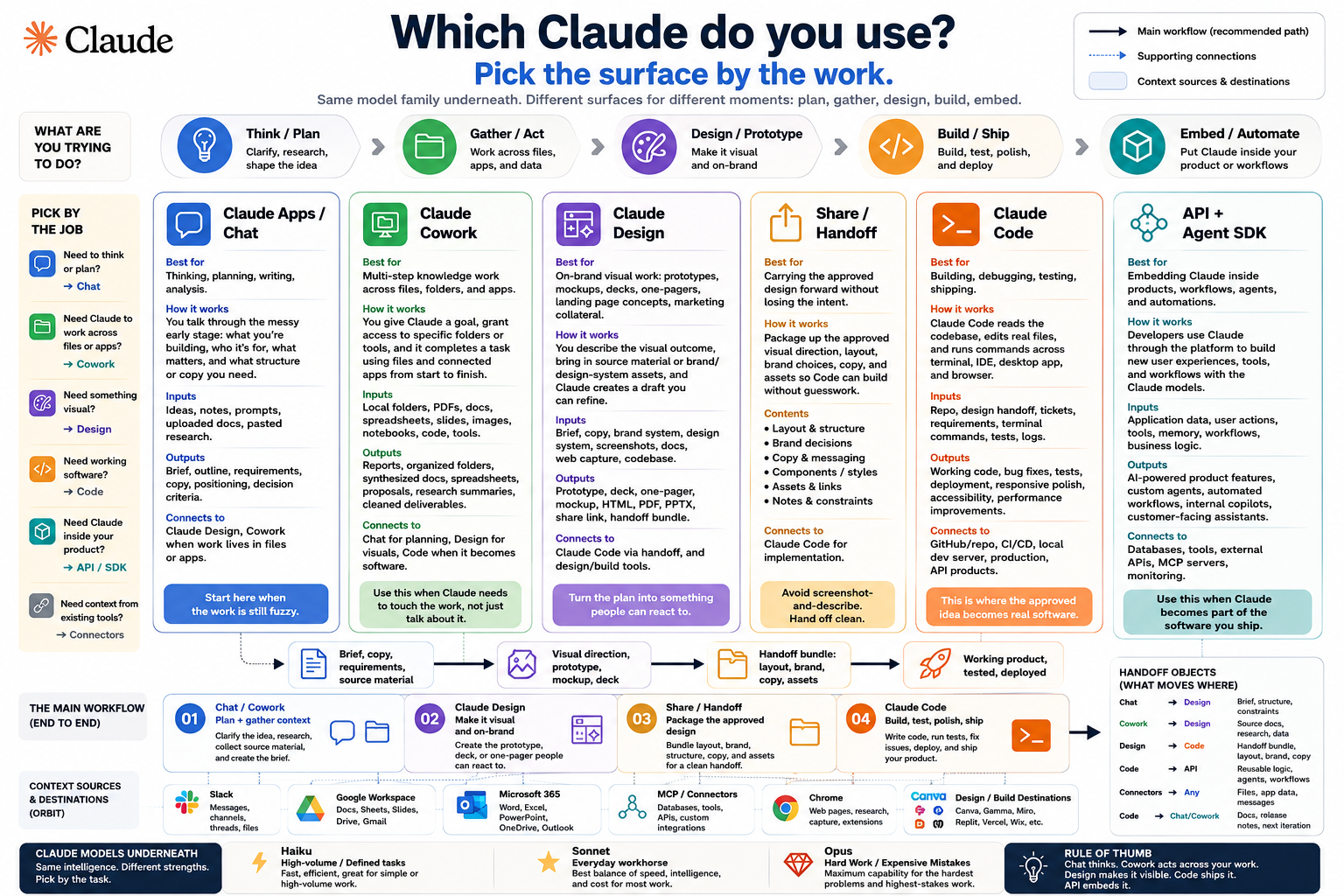
1. Plan it in chat (or Cowork)
Start in the Claude app. Don't ask for a finished thing yet — think out loud. What are we building, who is it for, what has to be true for it to work? Let Claude pressure-test the idea, draft the structure, write the copy, name the sections. If the raw material lives in your files and tools, do this in Claude Cowork instead so it can pull from what you already have. You leave this step with a clear plan and the words — not a vibe, a brief.
2. Make it beautiful in Claude Design
Now bring that plan into Claude Design. Describe what you want and it builds a first version you can actually see — a prototype, a deck, a one-pager, a real mockup. Two things make this the step that earns its keep:
- It applies your design system for you. Point it at your brand and it uses your colors, typography, and components — so the output looks like you shipped it, not like a template. Rich, on-brand, presentable to a client on the first pass.
- You refine by talking, not pixel-pushing. Leave inline comments on specific elements, edit text directly, or nudge spacing, color, and layout with live adjustment knobs until it is right.
You can export to Canva, PDF, PPTX, or standalone HTML at any point. But if the idea is something you intend to actually build, don't export — hand it off.
From our own desk
Honest admission: Claude Design turned out to be far more powerful than we expected. We thought it was for the occasional mockup. Instead it has become a daily part of how we work at OneWave — we now reach for it for 20 to 30 different things: client pitch decks, landing-page concepts, internal dashboards, one-pagers, proposal layouts, quick prototypes to settle a decision. If you have written it off as a toy, that is the mistake we almost made.
3. Hit Share — push it straight to Claude Code
This is the move most people miss. When a design is ready to build, Claude Design packages everything into a handoff bundle you pass to Claude Code with a single instruction. Your approved layout, the brand decisions, the structure, the copy — all of it travels with the design. No screenshot-and-describe, no "make it look like this" guesswork. The thing you signed off on is the thing Code starts from.
4. Let Claude Code build, polish, and ship
In Claude Code, the design becomes a real, working product. It writes the code, wires up the logic, runs and tests it, fixes what breaks, and deploys. This is also where the polish lives — the responsive behavior, the loading and empty states, the accessibility pass, the performance tuning that turns "looks great in the mockup" into "works great in the browser." You started with a thought; you end with something shipped.
Why this beats forcing one surface to do it all
You can ask the chat app to design, or ask Code to do your planning. It just costs you. Chat gives you words, not a design system. Code is brilliant at building but it is the wrong room to be deciding what the idea even is. Each handoff in this loop hands the next surface exactly what it is best at — and nothing it has to fight. That is why the same four steps work for a marketing page, an internal dashboard, a client proposal, or a quick prototype to settle an argument. The idea changes; the path doesn't.
A note on which model, not which surface
Separate from where you work is which model runs underneath. The rule of thumb: Haiku for high-volume, well-defined tasks, Sonnet as the everyday workhorse for most chat and coding, and Opus when the task is hard or a mistake is expensive. Most people leave the default in place and only reach for Opus on the genuinely thorny work — which is exactly right.
The takeaway
Stop asking "which Claude is the good one." They are all the good one, for different moments. Think in the chat app. Make it beautiful in Claude Design. Share it into Claude Code and ship. Once that loop is muscle memory, the distance between "I have an idea" and "it is live" collapses to an afternoon — for almost any idea you have.
This is the workflow we teach teams at OneWave AI. If your team is using one corner of Claude and wondering why it feels like more work than it should, talk to us — getting the surfaces and the handoffs right is most of the win.